
Disclosure: VPNFin is reader-supported. If you buy a VPN through links on this page, we may earn a commission at no extra cost to you. This never affects our ratings — here’s our full disclosure.
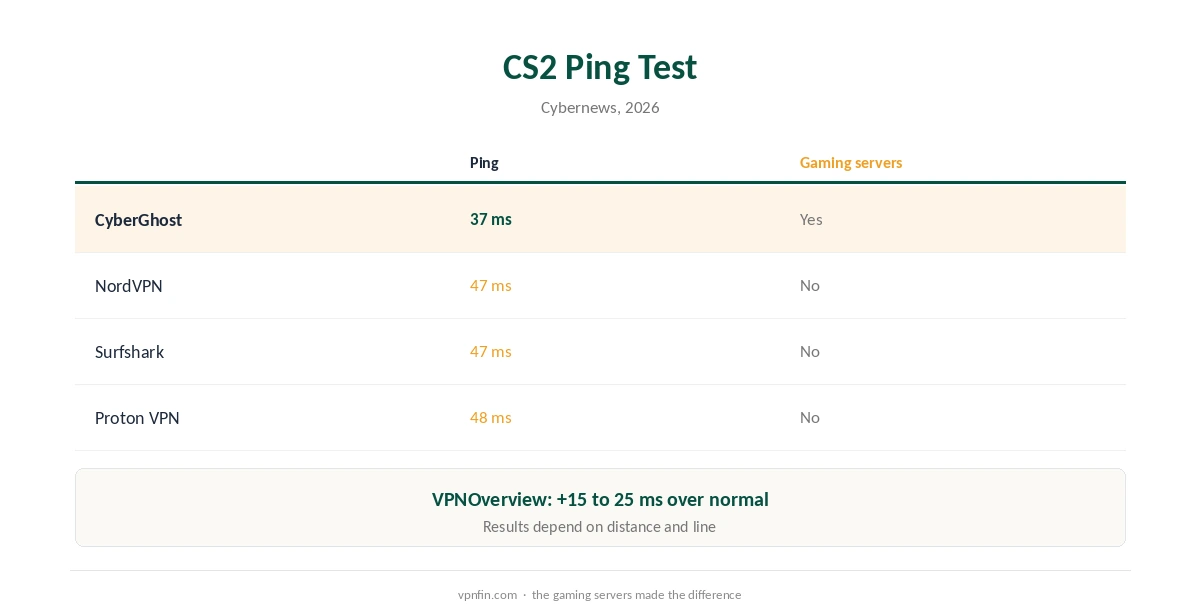
CyberGhost for gaming stands out for one feature: gaming-optimised servers. Of the providers Cybernews tested for gaming in 2026, including NordVPN, Surfshark and Proton VPN, CyberGhost alone had dedicated gaming servers, and it recorded the lowest ping in its Counter-Strike 2 test, 37 ms against 47 ms for NordVPN and Surfshark. VPNOverview saw ping rise by 15 to 25 ms in its January 2026 test, still fine for everyday play. Our page on CyberGhost for Warzone covers its gaming servers, the limits of SBMM and the anti-cheat risk.
This guide covers the gaming servers, the test results, the setup on PC and consoles, and what a VPN cannot fix.
Gaming Servers
CyberGhost’s app has a For Gaming server list, which PCWorld also notes in its review. CyberGhost’s own gaming page says the servers are designed for low ping and fast speeds. Pick one close to you, or close to the game’s servers if they sit far away. Our page on CyberGhost servers covers server counts, the specialty lists and how to pick one.
What the Tests Found
Cybernews’ 2026 gaming test used Counter-Strike 2. CyberGhost’s gaming servers gave 37 ms, NordVPN and Surfshark 47 ms, and Proton VPN 48 ms. VPNOverview’s January 2026 test measured a 15 to 25 ms increase over its normal ping, noticeable but playable.
Kripesh Adwani’s 2026 review found CyberGhost reliable on nearby servers but weaker for competitive play on distant ones. Distance is the biggest factor, whatever the provider.
CyberGhost for Gaming Setup on PC
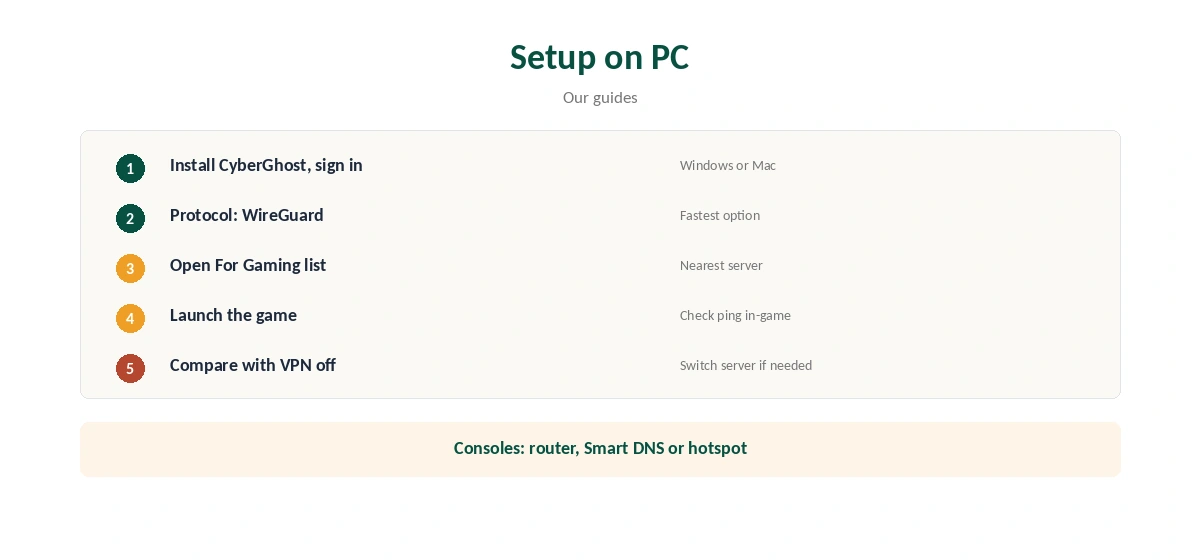
Install CyberGhost on your Windows PC or Mac and sign in. Choose WireGuard as the protocol, CyberGhost’s main and fastest option, as our CyberGhost WireGuard guide explains. Open the For Gaming list and connect to the nearest server.
Launch the game and check ping in its network stats. Compare with the VPN off. If the difference is small, keep the VPN for protection; if it is large, try another gaming server.
Consoles
Consoles cannot run VPN apps. CyberGhost’s gaming page suggests a router to cover PlayStation, Xbox and Nintendo consoles. Our CyberGhost PS4 guide and Xbox guide cover the router, Smart DNS and hotspot routes.
What a VPN Helps With
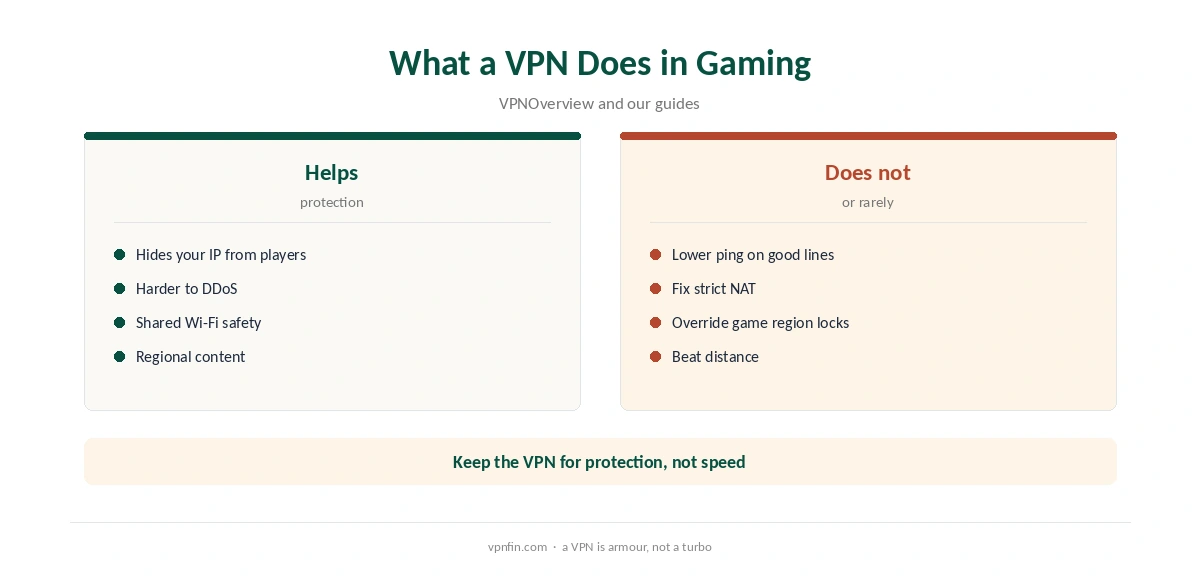
VPNOverview highlights protection from DDoS attacks: a VPN hides your home IP from other players. It also protects you on shared networks and can open games or regional content locked to another country.
A VPN can also help if your internet provider throttles gaming traffic or routes it poorly, though that varies by provider and is not guaranteed.
What a VPN Does Not Fix
A VPN adds a step between you and the game, so it rarely lowers ping on a good connection. CyberGhost offers no port forwarding, so strict NAT on consoles cannot be fixed through the VPN. Our gaming VPN guide explains the limits in detail.
Some games also restrict VPN use or lock your region to your account. Our Valorant VPN guide covers one example.
Routers for Whole-Home Gaming
CyberGhost’s gaming page recommends a router to cover consoles and smart TVs. ASUS routers include CyberGhost in VPN Fusion, which lets you choose which devices use the VPN, as our CyberGhost router guide explains. That lets a console use the VPN for protection while a streaming box stays off it.
Choosing a Server for Online Play
For matchmaking with friends nearby, pick the closest gaming server. For a game hosted in another region, a server near that region can sometimes shorten a poor route, though results vary. Test two or three servers in the same session and keep the one with the steadiest ping, not just the lowest single reading. Jitter, the variation between readings, often matters more in fast games than the average.
Gaming on Shared Networks
Hotel, campus and café networks are where a gaming VPN earns its keep. Other users on the same Wi-Fi cannot see your traffic, and some restrictive networks block game services that a VPN reaches. Our public Wi-Fi guide explains the risks of shared networks.
On Windows, CyberGhost’s app keeps the gaming server list one click away, as our CyberGhost Windows guide shows. Pin your best gaming server as a favourite.
Kill Switch and Disconnects
CyberGhost’s kill switch is on by default on Windows, BleepingComputer notes. A drop mid-match cuts the connection rather than exposing your IP. If the VPN drops often, our CyberGhost speed guide covers protocol and server changes.
What CyberGhost Costs
CyberGhost renews at $56.94 a year on its 2-year plan, according to our renewal table. It covers seven devices, and the 45-day money-back guarantee applies to website purchases, as our CyberGhost refund guide explains.
| Provider | Renewal price | Per month | Tier |
|---|---|---|---|
| NordVPN | $139.08/yr | ~$11.59 | Basic |
| Surfshark | ~$79/yr | ~$6.58 | Starter |
| ExpressVPN | $99.95/yr | ~$8.33 | Basic |
| CyberGhost | $56.94/yr | ~$4.75 | 2-year |
| PureVPN | $47.95/yr | ~$4.00 | Standard, 2-year (1-year renews $57.95) |
| IPVanish | $89.99/yr | ~$7.50 | Essential |
| Windscribe | ~$69/yr | ~$5.75 | Pro |
| Proton VPN | ~$83.88/yr | ~$6.99 | VPN Plus |
| Mullvad | ~$65/yr | ~$5.40 | flat, no tiers |
| Norton VPN | $79.99/yr | ~$6.67 | Standard |
| Hotspot Shield | ~$95.99/yr | ~$8.00 | Premium annual |
| Astrill | $300 every 2 yrs | ~$12.50 | 2-year, same at renewal |
Related Guides
Our NordVPN gaming guide covers a rival without gaming servers; NordVPN and Surfshark share an owner, Nord Security. To confirm your IP while gaming, use our VPN test page. CyberGhost belongs to Kape Technologies, which also owns ExpressVPN and Private Internet Access.
How We Research
This page draws on Cybernews’ 2026 gaming VPN test, VPNOverview’s January 2026 CyberGhost review, Kripesh Adwani’s 2026 review, PCWorld, BleepingComputer, CyberGhost’s gaming page and our renewal table. We cross-checked these sources against each other, and where they conflict or something can’t be verified, we say so in the text rather than guessing. We checked time-sensitive figures, including prices in US dollars, on 6 October 2026. Renewal from our renewal table. The main source we relied on is Cybernews’ gaming VPN test. Our full approach lives on the About Us page.
CyberGhost for Gaming FAQ
Yes. Among the providers Cybernews tested in 2026, including NordVPN and Surfshark, only CyberGhost had them.
37 ms in Cybernews’ CS2 test; VPNOverview saw a 15 to 25 ms increase.
Rarely on a good connection. Its gaming servers keep the added delay small.
Through a router, Smart DNS or a Windows hotspot. Consoles cannot run VPN apps.
No. It has no port forwarding.
The Verdict
CyberGhost for gaming is a strong pick thanks to its gaming servers, which gave the best ping in Cybernews’ 2026 test. Use the nearest server, keep WireGuard on, and expect protection rather than lower ping.