
Disclosure: VPNFin is reader-supported. If you buy a VPN through links on this page, we may earn a commission at no extra cost to you. This never affects our ratings — here’s our full disclosure.
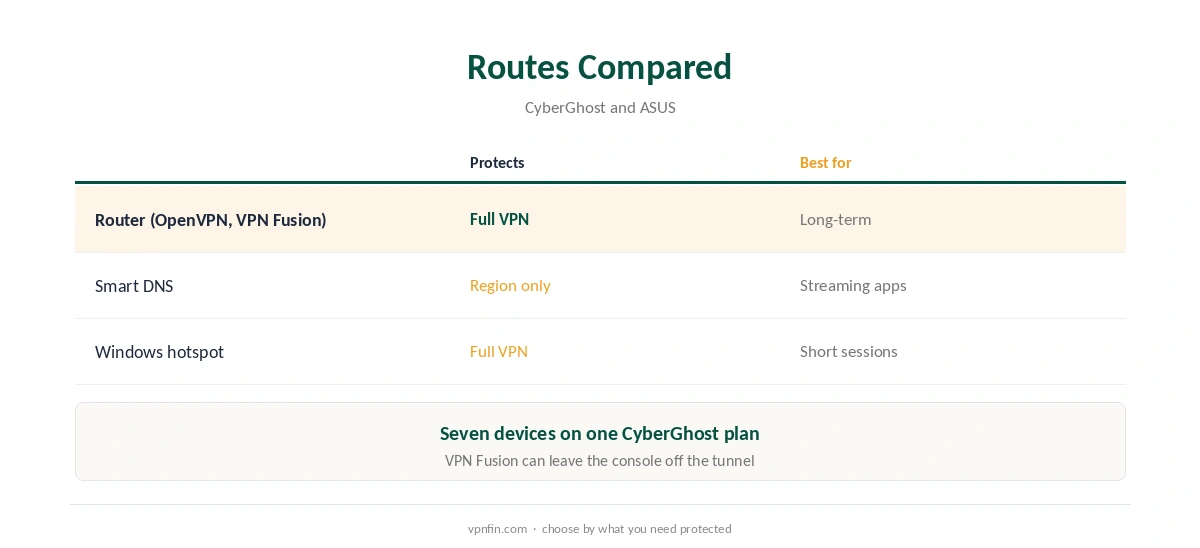
CyberGhost on PS4 works through one of three routes, because PlayStation consoles cannot install VPN apps. CyberGhost’s own guide covers the PS5, PS4 and PS3 together: a router running CyberGhost, its Smart DNS service, or a Windows PC sharing its connection. The same steps apply to a PS5.
This guide covers each route, what it protects, the Smart DNS settings on the console, and the NAT and ping questions that matter for online play.
Why Use CyberGhost on a PlayStation
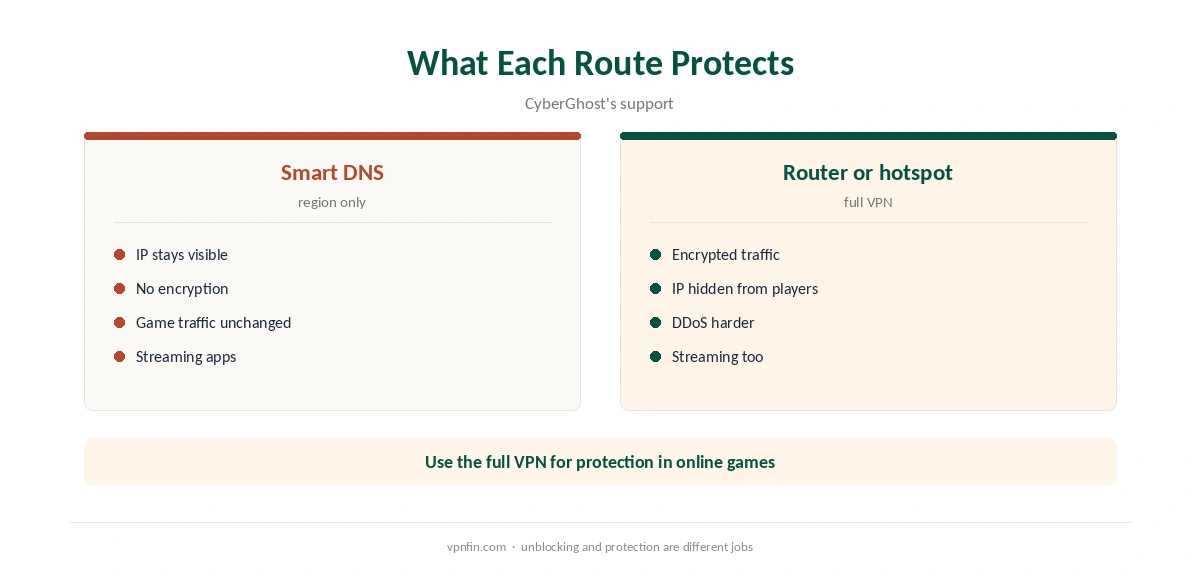
A full VPN hides your home IP from other players, which makes DDoS attacks harder, and protects the console on shared networks. Smart DNS does neither; it only helps streaming apps see another region. Our gaming VPN guide explains what to expect from each.
CyberGhost on PS4 With Smart DNS
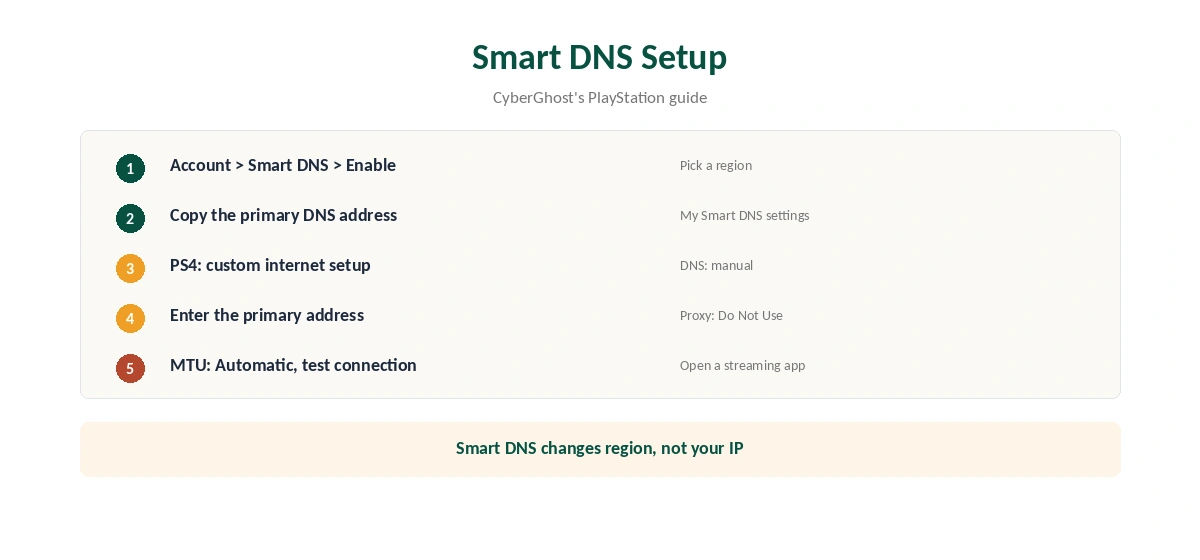
In your CyberGhost account, open the Smart DNS tab and choose Enable Smart DNS, as CyberGhost’s guide describes. It offers Smart DNS for Germany, Japan, the Netherlands, the UK and the US. Copy the primary DNS address for the region you want.
On the console, open the network settings and set up the internet connection with custom settings. Choose manual DNS and enter the primary address. CyberGhost’s guide then sets the proxy server to Do Not Use and the MTU to Automatic. Test the connection and open a streaming app.
What Smart DNS Does Not Do
CyberGhost’s support explains that Smart DNS only changes DNS addresses. Your IP stays visible, nothing is encrypted, and game traffic is untouched. It suits streaming apps on the PS4, not protection in online games. Our Smart DNS vs VPN page explains the difference.
Is CyberGhost on PS4 Worth It?
For streaming apps and occasional protection on shared networks, yes. For competitive online play, the gains are small and NAT problems can outweigh them. Decide which you need before setting up CyberGhost on PS4.
CyberGhost on PS4 Through a Router
CyberGhost provides OpenVPN configuration files for routers, its guide notes. ASUS routers on recent firmware include CyberGhost in VPN Fusion, which lets you choose which devices use the VPN, as our CyberGhost router guide explains. Connect the PS4 to the router by cable or Wi-Fi.
CyberGhost on PS4 Through a Windows PC
CyberGhost’s guide also describes a Windows hotspot. Connect CyberGhost on the PC, open Settings, Network and Internet, Mobile hotspot, set a name and password, and turn it on. Then join that network from the PS4’s Wi-Fi settings. The PC must stay on while you play. Our CyberGhost Windows guide covers the app.
Streaming Apps on the PS4
The PS4 runs Netflix, YouTube and other streaming apps. With Smart DNS or the full VPN, those apps see the chosen region. Close an app fully and reopen it after any change, since console apps cache location. Our CyberGhost smart TV guide covers Smart DNS on TVs, which works the same way.
Kill Switch on the Hotspot PC
When a PC shares its CyberGhost connection, the app on the PC protects the tunnel. Its kill switch is on by default on Windows, BleepingComputer notes, so the PS4 loses internet rather than falling back to your real address if the VPN drops. Our kill switch guide explains why that matters.
NAT Type and Party Chat
Behind a VPN, a PlayStation can show a strict NAT type, which limits joining some games and can break party chat. CyberGhost does not offer port forwarding, so the VPN cannot open ports for the console. If NAT problems persist, keep the PS4 outside the VPN for online play, or leave it off the tunnel in ASUS VPN Fusion.
Ping and Server Choice
Pick the CyberGhost server closest to you, not one near a particular game region. Measure ping in the game with and without the VPN. If the difference is small, keep the setup for protection; if it is large, try another nearby city.
Testing a CyberGhost on PS4 Setup
Run the console’s own connection test after any change. For the full VPN routes, confirm the public IP from a phone on the same network with our VPN test page. For Smart DNS, open a streaming app and check the catalogue, and run our DNS leak guide from a computer if results look wrong.
What CyberGhost Costs
CyberGhost renews at $56.94 a year on its 2-year plan, according to our renewal table. It covers seven devices, and a router or PC takes one of them. The 45-day money-back guarantee applies to website purchases, as our CyberGhost refund guide explains.
| Provider | Renewal price | Per month | Tier |
|---|---|---|---|
| NordVPN | $139.08/yr | ~$11.59 | Basic |
| Surfshark | ~$79/yr | ~$6.58 | Starter |
| ExpressVPN | $99.95/yr | ~$8.33 | Basic |
| CyberGhost | $56.94/yr | ~$4.75 | 2-year |
| PureVPN | $47.95/yr | ~$4.00 | Standard, 2-year (1-year renews $57.95) |
| IPVanish | $89.99/yr | ~$7.50 | Essential |
| Windscribe | ~$69/yr | ~$5.75 | Pro |
| Proton VPN | ~$83.88/yr | ~$6.99 | VPN Plus |
| Mullvad | ~$65/yr | ~$5.40 | flat, no tiers |
| Norton VPN | $79.99/yr | ~$6.67 | Standard |
| Hotspot Shield | ~$95.99/yr | ~$8.00 | Premium annual |
| Astrill | $300 every 2 yrs | ~$12.50 | 2-year, same at renewal |
Related Guides
Our CyberGhost Xbox guide covers the other console with the same three routes. Our PS5 VPN guide compares providers for PlayStation.
For rivals, see our NordVPN PS5 guide and Surfshark PS5 guide; both brands belong to Nord Security. CyberGhost belongs to Kape Technologies, which also owns ExpressVPN and Private Internet Access.
CyberGhost on PS5
Everything on this page applies to the PS5 too. Neither console runs a VPN app. The routes are the same: CyberGhost Smart DNS for streaming apps, a router running CyberGhost, or a Windows PC sharing its connection.
On the PS5, open Settings, Network, Settings, then Set Up Internet Connection. DNS sits under Advanced Settings for your network. NAT type, party chat and ping behave as described above for the PS4.
How We Research
This page draws on CyberGhost’s PlayStation setup guide, its Smart DNS support article, ASUS’s VPN Fusion guide, Netzwelt’s CyberGhost review and our renewal table. We cross-checked these sources against each other, and where they conflict or something can’t be verified, we say so in the text rather than guessing. We checked time-sensitive figures, including prices in US dollars, on 6 October 2026. Renewal from our renewal table. The main source we relied on is CyberGhost’s PlayStation guide. Our full approach lives on the About Us page.
CyberGhost on PS4 FAQ
No. PlayStation consoles cannot run VPN apps. Use a router, Smart DNS or a Windows hotspot.
Yes. CyberGhost’s guide covers the PS5, PS4 and PS3 together.
Germany, Japan, the Netherlands, the UK and the US, per CyberGhost’s guide.
No. It only changes DNS. Use the router or hotspot route for protection.
CyberGhost has no port forwarding. Keep the PS4 outside the VPN, or exclude it in ASUS VPN Fusion.
The Verdict
CyberGhost on PS4 runs through a router for protection, Smart DNS for quick streaming, or a Windows hotspot for short sessions. The same routes cover a PS5. Keep the console outside the VPN if NAT gets strict.