
Disclosure: VPNFin is reader-supported. If you buy a VPN through links on this page, we may earn a commission at no extra cost to you. This never affects our ratings — here’s our full disclosure.
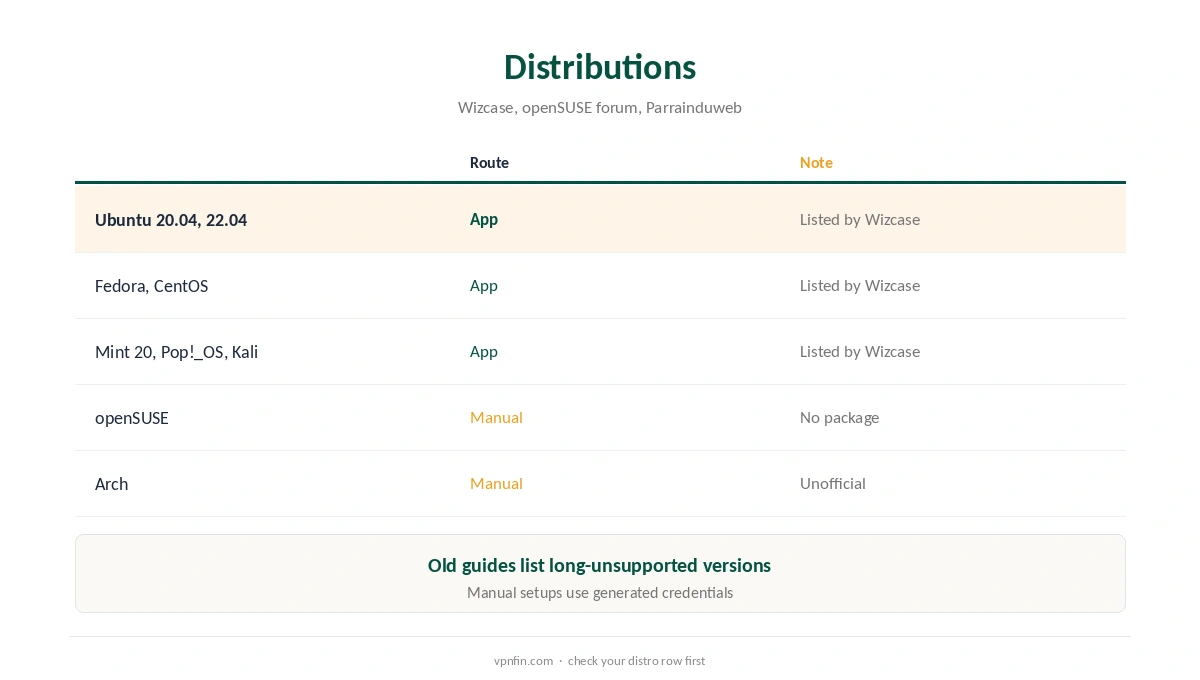
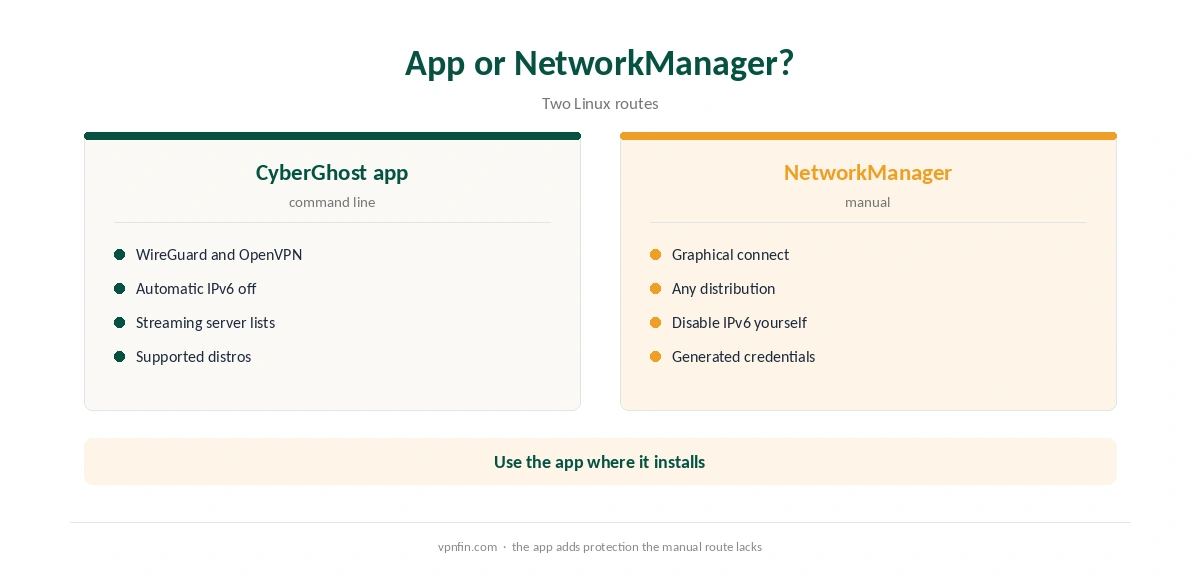
CyberGhost Linux support comes as a command-line app with no graphical interface, Wizcase’s 2026 Linux roundup notes. It supports WireGuard and OpenVPN and switches IPv6 off automatically to prevent leaks. Wizcase lists Ubuntu 20.04 and 22.04, Fedora, CentOS, Pop!_OS, Kali and Linux Mint 20 among supported systems. Other distributions use a manual OpenVPN or WireGuard setup. WizCase belongs to Kape, which also owns CyberGhost, so we weigh its findings alongside independent sources.
This guide covers installing the app, the distributions it supports, the manual route for the rest, and what the app lacks.
Installing the CyberGhost Linux App
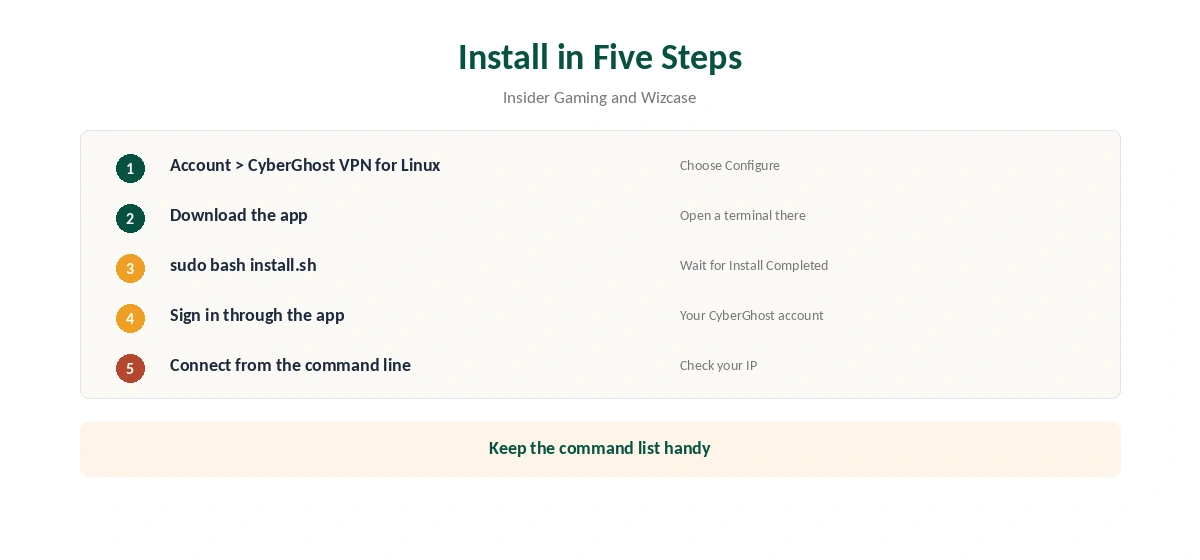
Insider Gaming describes the steps. Log in to your CyberGhost account, choose Configure next to CyberGhost VPN for Linux, and download the app. Open a terminal in the download folder and run the installer; Wizcase gives the command as sudo bash install.sh. Wait for the Install Completed message, then sign in through the app.
Connect to a server from the command line. Wizcase shows the app’s list of commands, which is worth keeping handy until the commands become familiar.
Supported Distributions
Wizcase lists Ubuntu 20.04 and 22.04, Fedora 32, CentOS 7, Pop!_OS, Kali and Linux Mint 20. A thread on the openSUSE forums notes CyberGhost publishes packages for Ubuntu, Fedora and a few others, but none for openSUSE. Parrainduweb, a French blog that has used CyberGhost on Linux for years, treats Arch as unofficial.
Older guides list Ubuntu 16 to 19 and Fedora 29 to 31. Those versions are long out of support, so check CyberGhost’s current download page before installing on an older system.
WireGuard or OpenVPN
The app supports both. Parrainduweb reports WireGuard as the default and found it clearly faster in its tests on Ubuntu. Keep OpenVPN for networks that block WireGuard. Our WireGuard vs OpenVPN page explains the trade-off.
The Manual Route for Other Distributions
On openSUSE, Arch and other systems without a package, the openSUSE forum suggests NetworkManager with OpenVPN or WireGuard instead. Create a manual device in the CyberGhost account, download the configuration bundle and use the generated username and password, not your account login. Our CyberGhost OpenVPN guide covers the credentials and the AUTH_FAILED error.
NetworkManager gives a graphical way to connect, which some users prefer to the command-line app. It lacks the app’s extras, such as streaming server lists.
IPv6 and Leaks
Wizcase notes the app switches IPv6 off automatically, which stops traffic leaking around the tunnel on networks that use both IPv4 and IPv6. A manual NetworkManager setup does not do that for you. Our IPv6 leak guide explains how to check and disable IPv6 by hand.
Gaming and the Steam Deck
Insider Gaming notes the Linux app makes gaming on Linux systems such as the Steam Deck more practical. On a Steam Deck, installing software is more involved, as our Steam Deck VPN guide explains, so check the steps before buying.
Servers and Headless Machines
A command-line app suits servers and headless machines well, since there is no desktop to need. For a Raspberry Pi, Parrainduweb notes a manual OpenVPN setup is the route, as our CyberGhost Raspberry Pi guide explains.
After connecting, run a DNS test with our DNS leak guide. The app’s automatic IPv6 handling covers one leak path; a DNS check confirms the other.
Who the CyberGhost Linux App Suits
The app suits people comfortable in a terminal who run a mainstream distribution: developers, server admins and Linux desktop users who do not mind typing a command to connect. It gives them WireGuard, automatic IPv6 protection and CyberGhost’s server network without manual configuration files.
Newcomers who want to click a country on a map will find it harder. For them, a provider with a Linux GUI, or NetworkManager with a manual profile, is the friendlier route for everyday use.
What the Linux App Lacks
There is no graphical interface, which can put off newcomers to the command line. Insider Gaming adds that CyberGhost’s support helps with the app but not with the operating system itself. If you want a Linux GUI, NordVPN, Surfshark and PureVPN offer one, as our NordVPN Linux guide and Surfshark Linux guide show; NordVPN and Surfshark share an owner, Nord Security.
What CyberGhost Costs
CyberGhost renews at $56.94 a year on its 2-year plan, according to our renewal table. It covers seven devices, and a Linux computer takes one of them. The 45-day money-back guarantee applies to website purchases, as our CyberGhost refund guide explains.
| Provider | Renewal price | Per month | Tier |
|---|---|---|---|
| NordVPN | $139.08/yr | ~$11.59 | Basic |
| Surfshark | ~$79/yr | ~$6.58 | Starter |
| ExpressVPN | $99.95/yr | ~$8.33 | Basic |
| CyberGhost | $56.94/yr | ~$4.75 | 2-year |
| PureVPN | $47.95/yr | ~$4.00 | Standard, 2-year (1-year renews $57.95) |
| IPVanish | $89.99/yr | ~$7.50 | Essential |
| Windscribe | ~$69/yr | ~$5.75 | Pro |
| Proton VPN | ~$83.88/yr | ~$6.99 | VPN Plus |
| Mullvad | ~$65/yr | ~$5.40 | flat, no tiers |
| Norton VPN | $79.99/yr | ~$6.67 | Standard |
| Hotspot Shield | ~$95.99/yr | ~$8.00 | Premium annual |
| Astrill | $300 every 2 yrs | ~$12.50 | 2-year, same at renewal |
Testing and Related Guides
After connecting, check your IP with our VPN test page. To disconnect or remove the app, our Linux VPN off guide covers the steps. Our Linux VPN guide compares providers. CyberGhost belongs to Kape Technologies, which also owns ExpressVPN and Private Internet Access.
How We Research
This page draws on Wizcase’s 2026 Linux VPN roundup, Insider Gaming’s CyberGhost Linux guide, an openSUSE forum thread, Parrainduweb’s CyberGhost Linux guide and our renewal table. We cross-checked these sources against each other, and where they conflict or something can’t be verified, we say so in the text rather than guessing. We checked time-sensitive figures, including prices in US dollars, on 6 October 2026. Renewal from our renewal table. The main source we relied on is Insider Gaming’s CyberGhost Linux guide. Our full approach lives on the About Us page.
CyberGhost Linux FAQ
Yes, a command-line app with no graphical interface, Wizcase notes.
Wizcase lists Ubuntu 20.04 and 22.04, Fedora, CentOS, Pop!_OS, Kali and Mint 20.
Through NetworkManager with a manual OpenVPN or WireGuard configuration.
Yes, alongside OpenVPN. Parrainduweb reports WireGuard as the default.
Yes. Wizcase notes the app disables IPv6 automatically.
The Verdict
CyberGhost Linux support is solid for command-line users on Ubuntu, Fedora, Mint and similar systems, with WireGuard and automatic IPv6 protection. Other distributions need a manual setup, and anyone wanting a GUI should look at rivals.