
Disclosure: VPNFin is reader-supported. If you buy a VPN through links on this page, we may earn a commission at no extra cost to you. This never affects our ratings — here’s our full disclosure.
PureVPN Android TV support gives the TV three split tunnelling modes you can set with a remote. Sign-in is gentle on the remote as well, because the app shows a six-digit code instead of asking for a password. What PureVPN does not publish is a device list for Android TV boxes.
This guide covers setup, the split tunnelling modes, how the app compares with CyberGhost’s TV app and what the plan costs after the first term.
Is PureVPN Good on Android TV?
Yes, if you want control over which apps use the VPN. PureVPN’s support pages document split tunnelling, protocol switching and general settings for the Android TV app. Its release notes add widgets and location shortcuts. However, PureVPN gives no list of supported boxes, so check Google Play on the device itself before paying.
How to Install PureVPN on Android TV
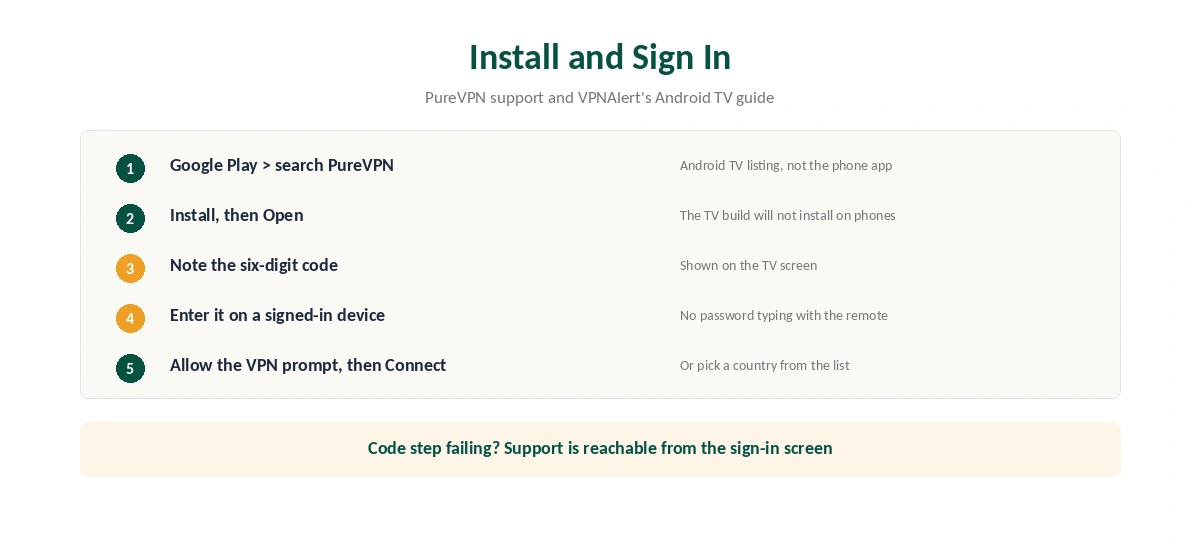
First, open Google Play on the TV and search for PureVPN. Then choose Install and open the app. The Android TV build is a separate listing, and APKMirror notes that it installs only on Android TV, not on phones.
Next, sign in. According to VPNAlert’s guide, the TV shows a six-digit code that you enter on another device, so you never type a password with the remote. After that, accept the Android prompt that allows a VPN connection. Finally, press Connect or choose a country from the location list.
PureVPN’s release notes also mention a support contact on the sign-in screen. That helps if the code step fails, since you can reach PureVPN without leaving the TV.
PureVPN Android TV Split Tunnelling
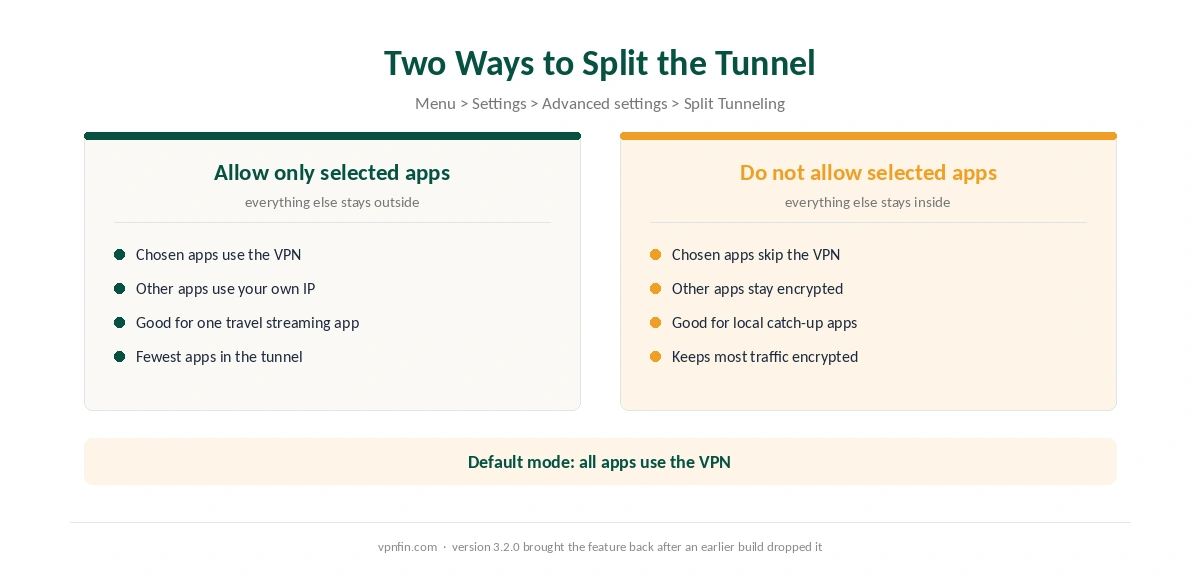
The setting sits under the menu icon, then Settings, then Advanced settings, according to PureVPN’s support article. By default, every app uses the VPN. Two other modes reverse the logic.
The first, Allow only selected apps to use VPN, sends chosen apps through the tunnel and leaves the rest on your home connection. The second, Do not allow selected apps to use VPN, keeps chosen apps outside. In practice, a local catch-up app can skip the tunnel while a travel streaming app uses it.
The feature has a history, too. APKMirror’s notes for version 3.2.0 say PureVPN brought split tunnelling back to the TV app, which means an earlier build had dropped it. Our split tunnelling explainer covers the privacy trade-off.
PureVPN Android TV vs CyberGhost Android TV
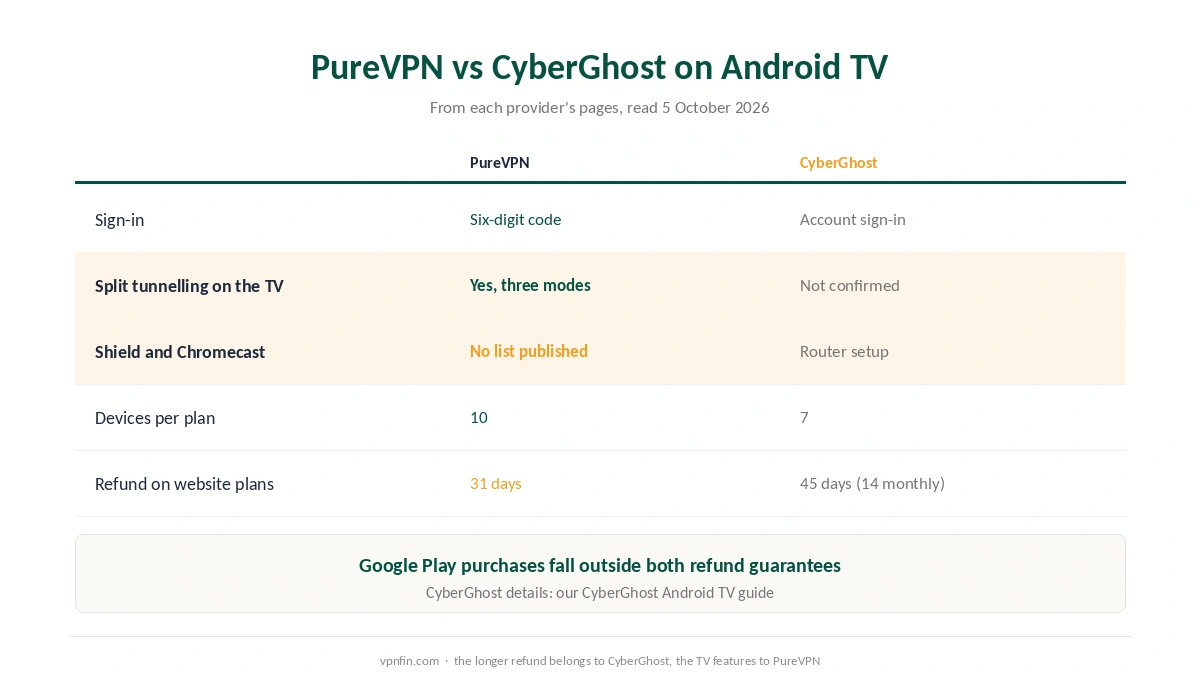
The two TV apps differ in useful ways. PureVPN signs in by code and documents split tunnelling on the TV. CyberGhost, by contrast, asks for an account sign-in, and we could not confirm split tunnelling in its TV app. Our CyberGhost Android TV guide covers that app in full.
Device lists differ as well. CyberGhost’s page routes the Nvidia Shield and the Chromecast with Google TV to a router. PureVPN publishes no such list either way. So on a Shield or a Google TV Streamer, the test is the same: search Google Play on the box. Our Nvidia Shield VPN guide lists apps that do appear.
PureVPN Android TV Problems and Fixes
If the app is missing from Google Play, the TV may run an old Android TV version, or the maker may block VPN apps. A router then covers the TV instead, and our router setup guide explains how.
If the connection drops, PureVPN’s own advice is to turn off automatic protocol selection and try another protocol. Also, Proton’s Android TV support notes a platform bug that can cut the Ethernet link when any VPN connects. Proton suggests updating the firmware or switching to Wi-Fi.
If a stream still shows your home region, clear that app’s cache and data in the TV’s app settings. Then reconnect. To rule the VPN out entirely, follow our guide to turning off a TV VPN.
What PureVPN Costs for Android TV
On 5 October 2026, PureVPN’s order page priced the Standard 2-year plan at $2.15 a month, billed $58.20 for 27 months. The plan then renews at $47.95 a year. However, a separate 2-year deal page showed $58.05, renewing at $54.95. Check the renewal line at checkout.
The 1-year plan costs $40.80 for 16 months and renews at $57.95. In other words, the shorter plan renews higher. The monthly plan costs $12.95, and one plan covers 10 devices. Our PureVPN Not Working With Netflix page goes into the proxy error and the fixes in order.
| Provider | Renewal price | Per month | Tier |
|---|---|---|---|
| NordVPN | $139.08/yr | ~$11.59 | Basic |
| Surfshark | ~$79/yr | ~$6.58 | Starter |
| ExpressVPN | $99.95/yr | ~$8.33 | Basic |
| CyberGhost | $56.94/yr | ~$4.75 | 2-year |
| PureVPN | $47.95/yr | ~$4.00 | Standard, 2-year (1-year renews $57.95) |
| IPVanish | $89.99/yr | ~$7.50 | Essential |
| Windscribe | ~$69/yr | ~$5.75 | Pro |
| Proton VPN | ~$83.88/yr | ~$6.99 | VPN Plus |
| Mullvad | ~$65/yr | ~$5.40 | flat, no tiers |
| Norton VPN | $79.99/yr | ~$6.67 | Standard |
| Hotspot Shield | ~$95.99/yr | ~$8.00 | Premium annual |
| Astrill | $300 every 2 yrs | ~$12.50 | 2-year, same at renewal |
Free Trial on Android TV and the Refund Catch
The Android TV listing on APKMirror advertises a 7-day trial without payment. That trial runs through Google Play, and PureVPN’s refund policy marks Google Play purchases as non-refundable. It also excludes renewals after a trial. Our guide to PureVPN on Smart TVs covers Samsung, LG, Android TV and what works.
So treat the trial as a test, then cancel or buy on the website. A website purchase keeps the 31-day window, as our PureVPN refund guide explains. Our PureVPN trial guide covers the $0.99 web trial too.
Who Should Use PureVPN on Android TV
PureVPN Android TV suits viewers who want some apps inside the tunnel and others outside, set from the sofa. Code sign-in suits anyone tired of remote-control typing. Large households benefit too, with 10 devices on a plan. Our guide to PureVPN on Chromecast covers Google TV app, router for cast-only models.
Who Should Look Elsewhere
Look elsewhere if the app does not appear in Google Play on your box. Our NordVPN Android TV guide and Proton VPN Android TV guide cover two alternatives. Ownership may matter as well. PureVPN belongs to GZ Systems Limited, registered in the British Virgin Islands and part of the Gaditek group, which also absorbed Ivacy in 2024. For a wider comparison, see our smart TV VPN guide.
How We Research
This page draws on PureVPN’s Android TV support articles, release notes and refund policy. We also read APKMirror’s version notes, VPNAlert’s guide and Proton’s Android TV support. We cross-checked these sources against each other, and where they conflict or something can’t be verified, we say so in the text rather than guessing. We checked time-sensitive figures, including prices in US dollars, on 5 October 2026. PureVPN’s order page and its separate 2-year deal page showed different Standard prices that day. The main source we relied on is PureVPN’s Android TV split tunnelling guide. Our full approach lives on the About Us page.
PureVPN on Android TV FAQ
The TV app shows a six-digit code, according to VPNAlert. Enter it on another device that already uses your account, and the TV logs in without a password.
Yes. It sits under Settings, Advanced settings, with three modes: all apps use the VPN, only selected apps use it, or selected apps skip it.
PureVPN publishes no Android TV device list. Search Google Play on the box itself. If the app is missing, a VPN router is the fallback.
The free 7-day trial runs through Google Play. PureVPN’s policy marks Google Play purchases as non-refundable and excludes renewals after a trial, so cancel in time.
Ten at the same time on any plan. PureVPN also sells a multi-login add-on for more devices.
The Verdict
On Android TV, PureVPN offers more control than CyberGhost’s TV app: code sign-in, three split tunnelling modes and protocol choice. Its weak spots are the missing device list and a trial that bills through Google Play. Search the store on your box, test with the trial, then buy on the website. For Fire TV, our PureVPN Firestick guide covers that app.