
Disclosure: VPNFin is reader-supported. If you buy a VPN through links on this page, we may earn a commission at no extra cost to you. This never affects our ratings — here’s our full disclosure.
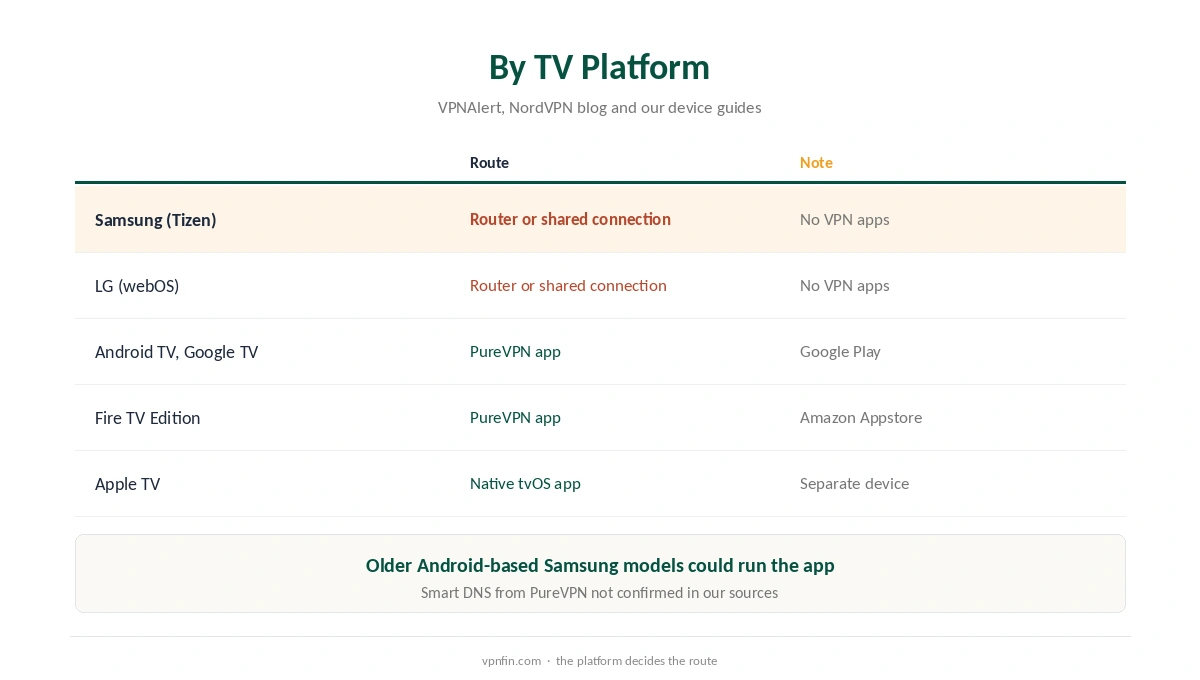
PureVPN on Samsung TV needs a workaround on most current models. Newer Samsung TVs run Tizen, which does not support the PureVPN app, VPNAlert notes, and NordVPN’s own smart TV guide confirms that Tizen and LG’s webOS block VPN apps generally. The routes that work are a VPN router or a computer sharing its PureVPN connection. TVs built on Android TV or Google TV are the exception: they run the app directly.
This guide covers each TV platform, the two workarounds, and how to keep streams stable.
Which Smart TVs Run the PureVPN App
Sony, Philips, TCL and other TVs built on Android TV or Google TV can install PureVPN from Google Play, as our PureVPN Android TV guide explains, including its code-based sign-in. Fire TV Edition sets use the Amazon Appstore, covered in our PureVPN Firestick guide.
Samsung’s Tizen and LG’s webOS cannot run VPN apps. VPNAlert notes that some much older Samsung models ran Android and could install the app, but current models cannot. Apple TV is a separate case with its own native app, as our PureVPN Apple TV guide shows.
PureVPN on Samsung TV Through a Router
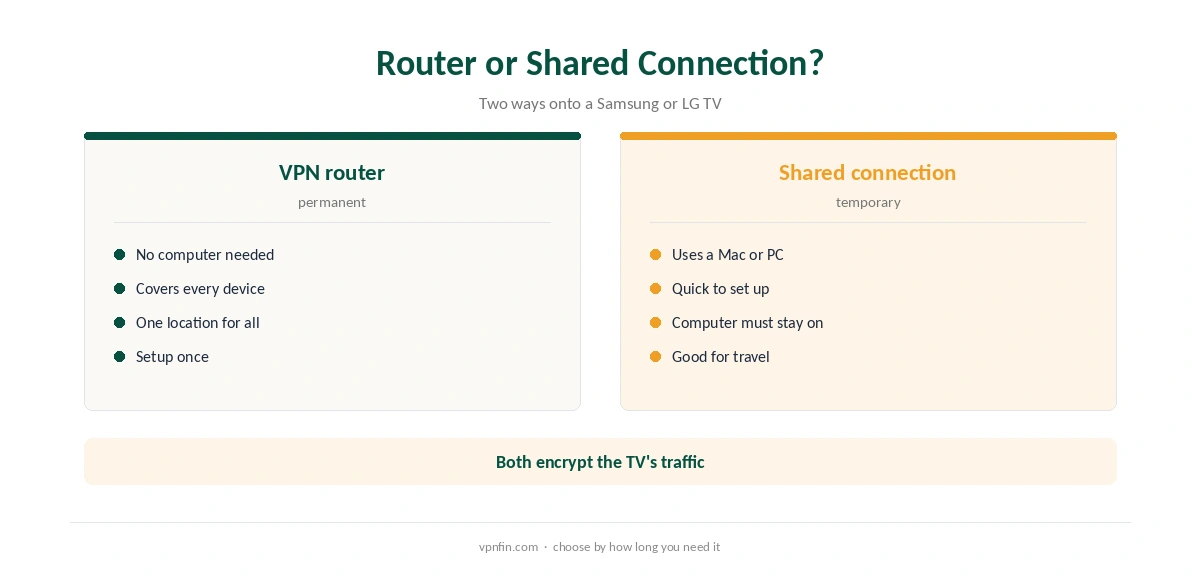
A VPN router is the most reliable route. The router connects to PureVPN, and every device behind it, including the TV, uses the tunnel without any app. PureVPN’s help centre lists supported routers from Asus to TP-Link, as our PureVPN router guide explains.
The trade-off is that every device on that router shares one location. Some households run a second router or a separate network just for the TV, so phones and laptops keep the normal connection.
PureVPN on Samsung TV Through a Shared Connection
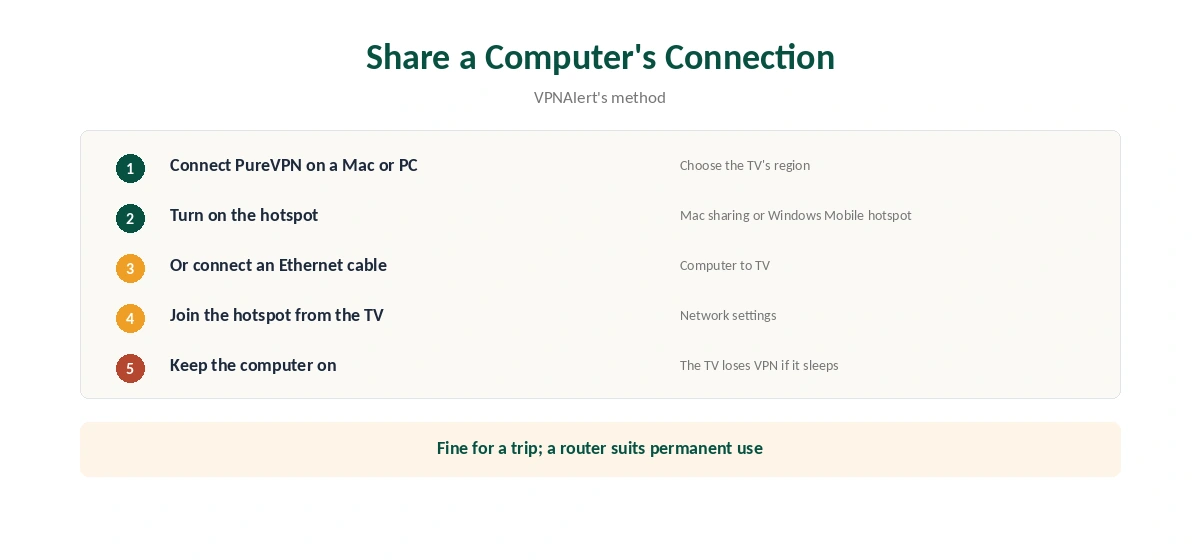
Without a VPN router, a computer can share its PureVPN connection. VPNAlert describes connecting a Mac to PureVPN and joining the Mac’s hotspot from the Samsung TV; sharing over an Ethernet cable works the same way. On Windows, the Mobile hotspot setting does the job.
The computer must stay on while you watch, which makes this a short-term fix for a trip rather than a permanent setup. Our PureVPN Mac guide and Windows guide cover the desktop apps.
What About Smart DNS?
Smart DNS lets TVs without VPN apps change region by switching DNS servers. NordVPN and Surfshark have offered it, as our NordVPN smart TV guide and Surfshark smart TV guide explain; both brands belong to Nord Security. We could not confirm a PureVPN Smart DNS service in the sources we read, so this guide does not rely on one.
Smart DNS also encrypts nothing, so even where it exists it is a region tool, not a privacy one. Our Smart DNS vs VPN page explains the difference.
PureVPN on Samsung TV in Hotels and Rentals
Hotel and holiday-rental TVs are the hardest case, because you cannot change their settings or their network. The practical answer is a small travel router running PureVPN. PureVPN’s help centre lists GL.iNet among its supported brands, and GL.iNet makes pocket-sized routers built for this job.
Connect the travel router to the hotel network, complete any sign-in page from a phone first, then connect your own streaming stick to the travel router. A Fire TV Stick or Chromecast with Google TV plugged into the hotel TV then runs through PureVPN, even though the TV itself never could.
This setup also protects your phones and laptop on the same trip, since they join the travel router too. Our public Wi-Fi guide explains why hotel networks deserve that extra care.
What PureVPN Costs
On 5 October 2026, PureVPN’s order page listed the Standard 2-year plan at $58.20 for the first 27 months, renewing at $47.95 a year. A separate deals page showed $58.05 for the same term with a $54.95 renewal, so the page you buy from changes the renewal by seven dollars a year. Check the renewal line at checkout.
One plan covers 10 devices, and a router or TV counts as one of them. PureVPN offers a 31-day money-back guarantee, as our PureVPN refund guide explains.
| Provider | Renewal price | Per month | Tier |
|---|---|---|---|
| NordVPN | $139.08/yr | ~$11.59 | Basic |
| Surfshark | ~$79/yr | ~$6.58 | Starter |
| ExpressVPN | $99.95/yr | ~$8.33 | Basic |
| CyberGhost | $56.94/yr | ~$4.75 | 2-year |
| PureVPN | $47.95/yr | ~$4.00 | Standard, 2-year (1-year renews $57.95) |
| IPVanish | $89.99/yr | ~$7.50 | Essential |
| Windscribe | ~$69/yr | ~$5.75 | Pro |
| Proton VPN | ~$83.88/yr | ~$6.99 | VPN Plus |
| Mullvad | ~$65/yr | ~$5.40 | flat, no tiers |
| Norton VPN | $79.99/yr | ~$6.67 | Standard |
| Hotspot Shield | ~$95.99/yr | ~$8.00 | Premium annual |
| Astrill | $300 every 2 yrs | ~$12.50 | 2-year, same at renewal |
Keeping Streams Stable
Pick a location in the country whose catalogue you need, and the nearest city within it for speed. If a streaming app shows the wrong region, close it fully and reopen it after the VPN connects, since TV apps cache location. If a service blocks one server, switch to another city in the same country. Wired connections from the router to the TV also tend to hold a stream more steadily than Wi-Fi in a crowded building.
Confirm the connection from a phone on the same network with our VPN test page. Our smart TV VPN guide compares other providers. PureVPN belongs to Gaditek, which absorbed Ivacy in 2024.
How We Research
This page draws on VPNAlert’s PureVPN Samsung guide, NordVPN’s smart TV guide, SpeedTestHQ’s smart TV notes and PureVPN’s router help pages and pricing. We cross-checked these sources against each other, and where they conflict or something can’t be verified, we say so in the text rather than guessing. We checked time-sensitive figures, including prices in US dollars, on 5 October 2026. PureVPN showed two price grids on different pages that day. The main source we relied on is VPNAlert’s PureVPN Samsung guide. Our full approach lives on the About Us page.
PureVPN on Smart TV FAQ
Not on current Tizen models. Use a VPN router or share a computer’s PureVPN connection.
LG’s webOS cannot run VPN apps either, so the same router or shared-connection routes apply.
TVs built on Android TV or Google TV, through Google Play, and Fire TV Edition sets.
We could not confirm one in the sources we read. Use a router or shared connection instead.
TV apps cache location. Close the app fully and reopen it after the VPN connects.
The Verdict
PureVPN on Samsung TV and LG TV means a router or a shared computer connection. Android and Google TV sets run the app directly. For a permanent setup, the router route is the one to choose.