
Disclosure: VPNFin is reader-supported. If you buy a VPN through links on this page, we may earn a commission at no extra cost to you. This never affects our ratings — here’s our full disclosure.
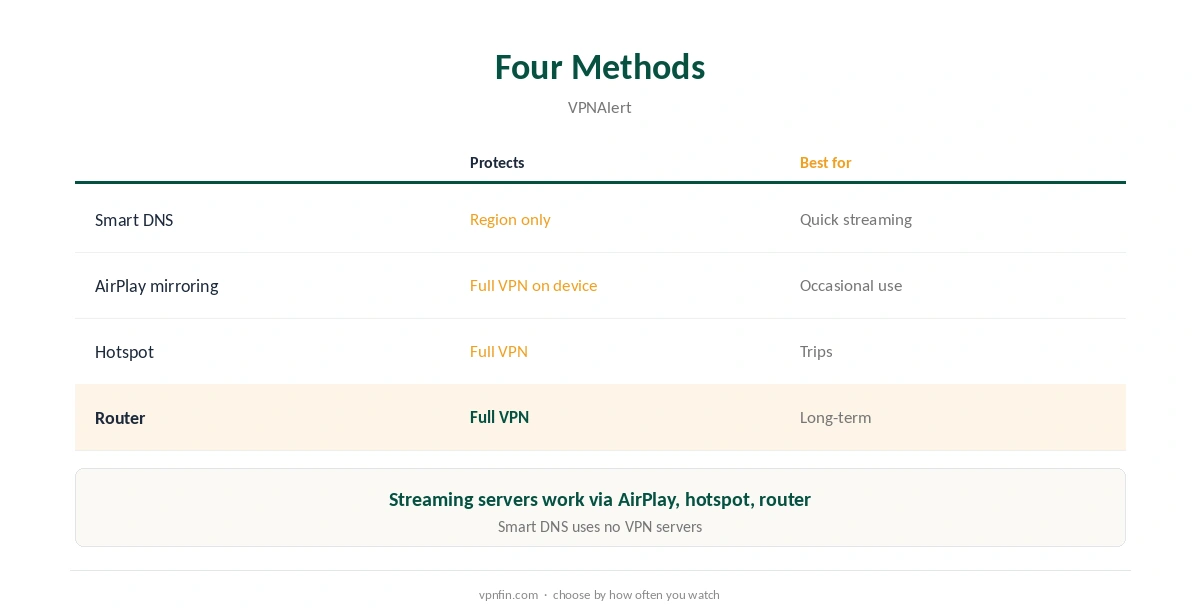
Apple TV CyberGhost setup needs a workaround. CyberInsider, Impulsec and Clubic all report in 2026 that CyberGhost has no Apple TV app, even though tvOS 17 and later can run VPN apps from rivals. Clubic notes CyberGhost’s Smart DNS works on Apple TV instead. VPNAlert lists three more routes: AirPlay from a device running CyberGhost, a hotspot, and a router.
A 2023 roundup by iThinkDiff listed a CyberGhost app in the Apple TV App Store, so check the store on your own Apple TV before choosing a method. This guide covers all four routes, what each protects, and how to test the result.
Apple TV CyberGhost Setup With Smart DNS
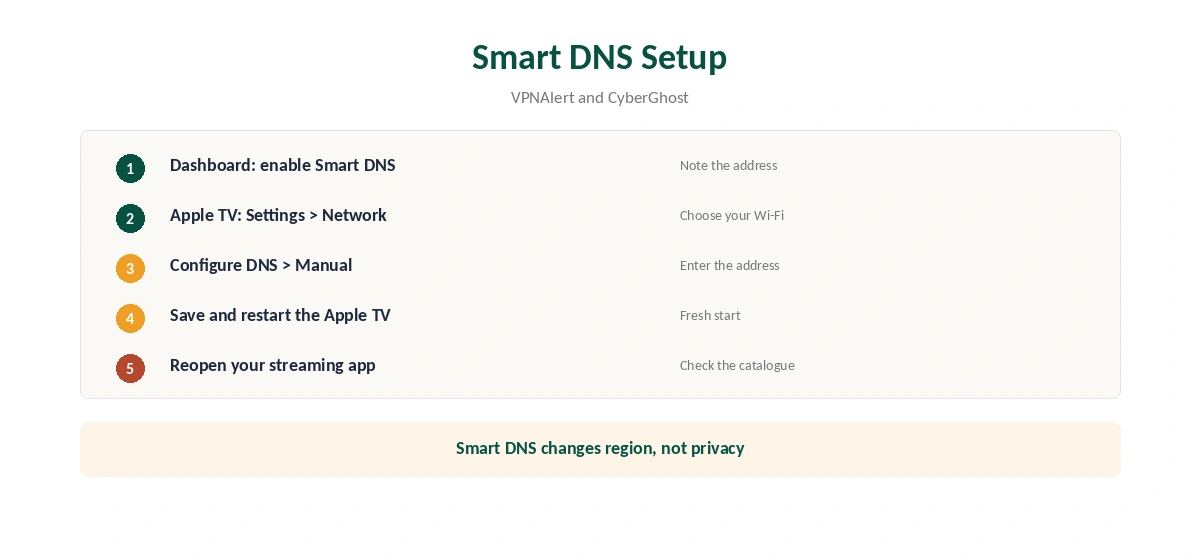
Enable Smart DNS in the CyberGhost account dashboard and note the DNS address it shows. On the Apple TV, VPNAlert gives the path: Settings, Network, your Wi-Fi network, Configure DNS, then Manual. Enter the address, save, and restart the Apple TV.
Then open a streaming app and check that the catalogue changed. If it did not, close the app fully and reopen it.
What Smart DNS Does Not Do
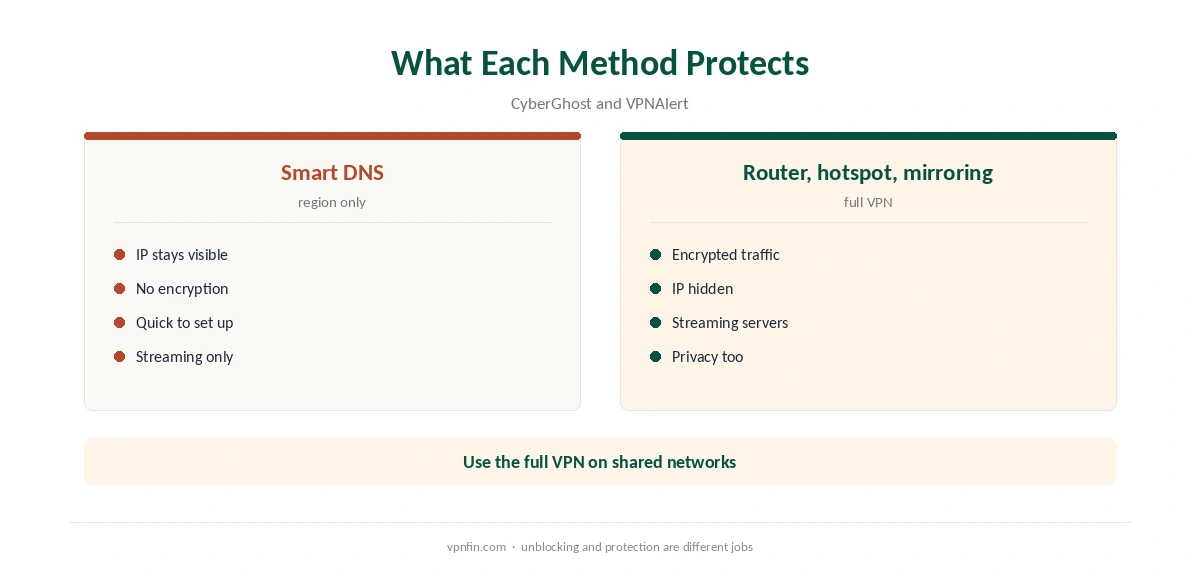
CyberGhost’s own support explains that Smart DNS only changes DNS. It helps apps see another region, but it does not encrypt traffic or hide your IP. Use it for streaming at home, not for privacy on a shared network. Our Smart DNS vs VPN page explains the difference, and our CyberGhost smart TV guide covers the same feature on other TVs.
AirPlay From an iPhone or Mac
VPNAlert’s second method uses AirPlay. Connect CyberGhost on an iPhone, iPad or Mac, then mirror the screen to the Apple TV. With screen mirroring, the picture comes from the device running CyberGhost, so the VPN covers it. Our CyberGhost iPhone guide and Mac guide cover the apps.
Some apps hand the stream to the Apple TV instead of mirroring it. In that case, the Apple TV fetches the video itself over your normal connection. If the catalogue does not change, use full screen mirroring rather than an app’s own AirPlay button.
A Hotspot From a CyberGhost Device
VPNAlert also suggests sharing a connection. Connect CyberGhost on a computer, turn on its hotspot, and join that network from the Apple TV’s Wi-Fi settings. All the Apple TV’s traffic then goes through CyberGhost. The computer must stay on while you watch.
The Router Route
VPNAlert calls a CyberGhost-compatible router the easiest long-term method. The router connects to CyberGhost, and the Apple TV and every other device behind it use the tunnel. Our router setup guide explains which routers support VPN clients. CyberGhost’s manual router setup uses OpenVPN, as our CyberGhost OpenVPN guide shows.
Streaming Servers on Apple TV
VPNAlert notes that CyberGhost’s streaming-optimised servers work on Apple TV through AirPlay, a hotspot or a router, since those routes use the full VPN. Smart DNS does not use VPN servers at all. Pick the streaming server labelled for your service on the device or router that runs CyberGhost. If one gets blocked, switch to another labelled server and reopen the app.
Which Apple TV Models Work
Smart DNS works on any Apple TV that lets you set DNS manually in its network settings, which covers current models. The router, hotspot and AirPlay routes work on any Apple TV, since the VPN runs elsewhere. Only native VPN apps need tvOS 17 or later, which matters for rival providers rather than CyberGhost.
When Smart DNS Stops Working
Many Smart DNS services work only from registered home IP addresses. If your connection gets a new IP, for example after a router restart, check the CyberGhost dashboard and re-enable Smart DNS. Some internet providers also intercept DNS, which stops Smart DNS entirely; the router route avoids that. Impulsec found CyberGhost’s live chat helpful when a setup gets stuck.
To confirm a router or hotspot setup, check the public IP from a phone on the same network with our VPN test page.
Testing Apple TV CyberGhost Setups
Test whichever method you choose with the streaming app you use most. Note the catalogue before and after, and keep the method that changes it reliably.
What CyberGhost Costs
CyberGhost renews at $56.94 a year on its 2-year plan, according to our renewal table. It covers seven devices. The 45-day money-back guarantee applies to website purchases, as our CyberGhost refund guide explains.
| Provider | Renewal price | Per month | Tier |
|---|---|---|---|
| NordVPN | $139.08/yr | ~$11.59 | Basic |
| Surfshark | ~$79/yr | ~$6.58 | Starter |
| ExpressVPN | $99.95/yr | ~$8.33 | Basic |
| CyberGhost | $56.94/yr | ~$4.75 | 2-year |
| PureVPN | $47.95/yr | ~$4.00 | Standard, 2-year (1-year renews $57.95) |
| IPVanish | $89.99/yr | ~$7.50 | Essential |
| Windscribe | ~$69/yr | ~$5.75 | Pro |
| Proton VPN | ~$83.88/yr | ~$6.99 | VPN Plus |
| Mullvad | ~$65/yr | ~$5.40 | flat, no tiers |
| Norton VPN | $79.99/yr | ~$6.67 | Standard |
| Hotspot Shield | ~$95.99/yr | ~$8.00 | Premium annual |
| Astrill | $300 every 2 yrs | ~$12.50 | 2-year, same at renewal |
Related Guides
If a native app matters to you, NordVPN, Surfshark and PureVPN all have tvOS apps, as our NordVPN Apple TV guide, Surfshark Apple TV guide and PureVPN Apple TV guide show. NordVPN and Surfshark share an owner, Nord Security. CyberGhost belongs to Kape Technologies, which also owns ExpressVPN and Private Internet Access.
Our Apple TV VPN guide compares providers, and our Apple TV VPN off guide explains how to set DNS back to automatic.
How We Research
This page draws on CyberInsider, Impulsec, Clubic and iThinkDiff on CyberGhost and Apple TV, VPNAlert’s CyberGhost Apple TV guide, CyberGhost’s Smart DNS support article and our renewal table. We cross-checked these sources against each other, and where they conflict or something can’t be verified, we say so in the text rather than guessing. We checked time-sensitive figures, including prices in US dollars, on 6 October 2026. Renewal from our renewal table. The main source we relied on is VPNAlert’s CyberGhost Apple TV guide. Our full approach lives on the About Us page.
Apple TV CyberGhost FAQ
Not according to CyberInsider, Impulsec and Clubic in 2026. Check the App Store on your Apple TV.
Enable it in the dashboard, then Settings, Network, Wi-Fi, Configure DNS, Manual on the Apple TV.
No. CyberGhost says it only changes DNS and is not a security tool.
With full screen mirroring, yes. Some apps hand the stream to the Apple TV, which skips the VPN.
A router running CyberGhost, which VPNAlert calls the easiest.
The Verdict
Apple TV CyberGhost use runs through Smart DNS for quick streaming, or a router for full protection. AirPlay mirroring and a hotspot fill the gaps. If you want an app on the Apple TV itself, rivals offer one.