
Disclosure: VPNFin is reader-supported. If you buy a VPN through links on this page, we may earn a commission at no extra cost to you. This never affects our ratings — here’s our full disclosure.
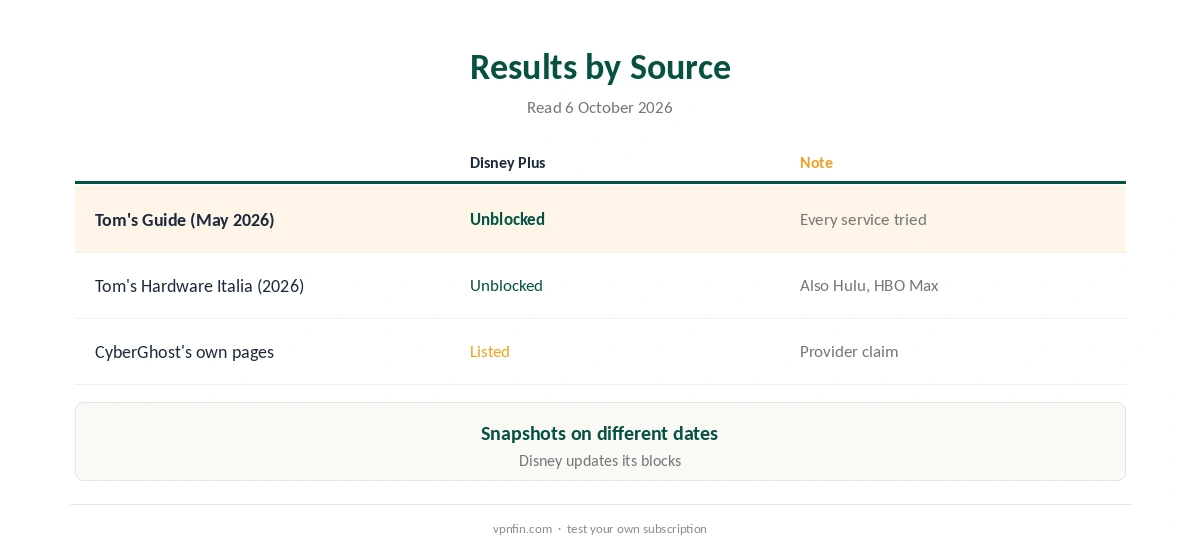
CyberGhost Disney Plus access worked in two 2026 tests. Tom’s Guide’s May 2026 streaming round found CyberGhost unblocking Disney Plus alongside Netflix and Prime Video, and Tom’s Hardware Italia reported Disney Plus working without problems in its own review. When Disney does block a server, error 73 appears, and Disney’s help pages name VPNs among its causes.
This guide covers the streaming servers, the setup, what error 73 means and the fixes.
What Testers Found
Tom’s Guide called CyberGhost’s May 2026 streaming results almost perfect, with every service it tried unblocked, Disney Plus included. Tom’s Hardware Italia listed Disney Plus among the services CyberGhost opened, with stable speeds of up to 950 Mbps on nearby WireGuard servers on a gigabit line.
Both are snapshots. Disney updates its blocks, so a server that works one week can fail the next.
CyberGhost Disney Plus Setup
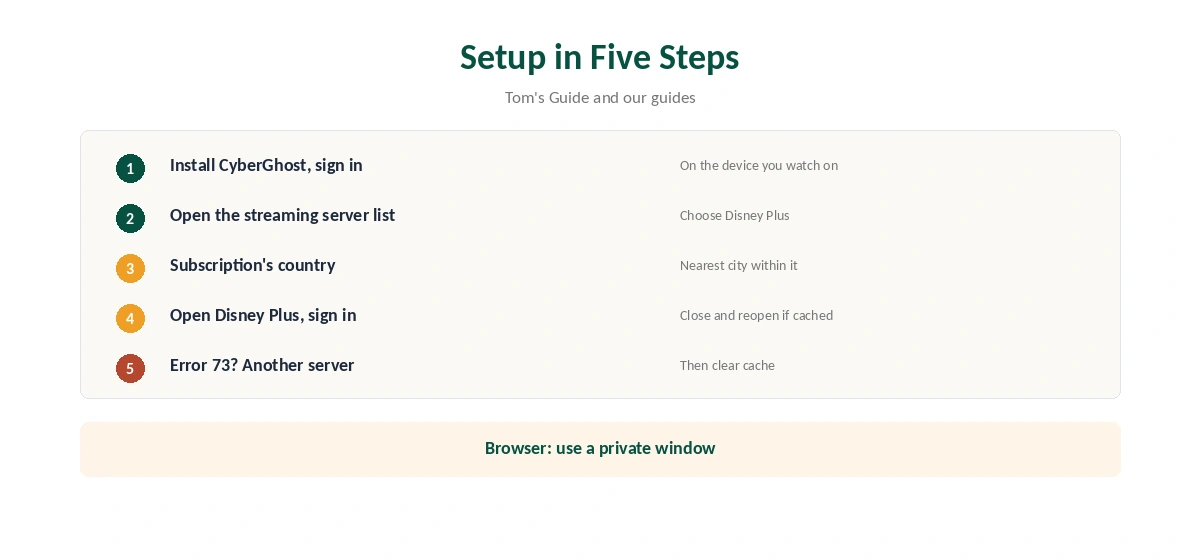
Install CyberGhost on the device you watch on and sign in. Open the streaming server list and choose a server labelled for Disney Plus in the country of your subscription. Then open Disney Plus and sign in.
If the app still shows your home region, close it fully and reopen it. On a browser, use a private window or clear cookies, so Disney reads the new location.
What Error 73 Means
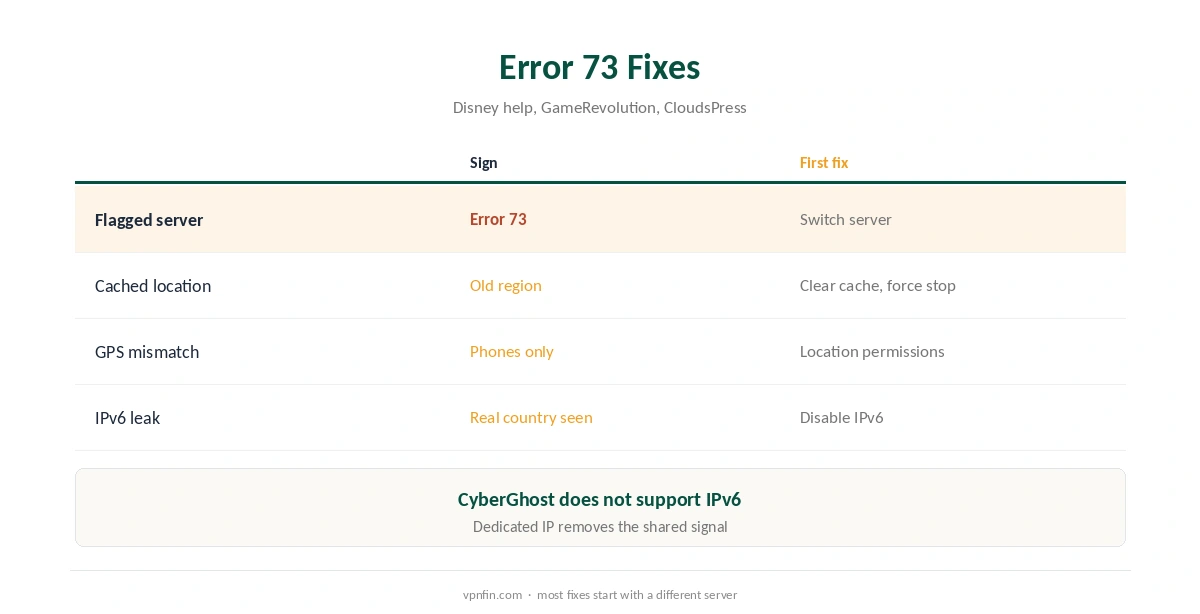
Error 73 appears when Disney Plus thinks you are somewhere it is not available. GameRevolution describes it as a disagreement between your real location and the one your device reports. Disney’s help pages list a VPN or IP anonymiser among the causes.
Fixes in Order
First, switch to another Disney Plus server in the same country. Second, clear the app’s cache or force-stop it; CloudsPress gives the path on Android TV and Fire TV through the apps list. Third, check location permissions on phones, since GPS can contradict the VPN.
Fourth, test for leaks with our IPv6 leak guide and DNS leak guide. CyberGhost’s Windows support notes it does not support IPv6, so disable it if your network uses it. Our CyberGhost troubleshooting guide lists more fixes.
Disney Plus on TVs and Sticks
On Fire TV, CyberGhost’s app supports Fire OS 6 and later, as our CyberGhost Firestick guide explains; Vega OS sticks have no app. Android TV runs the app too, covered in our Android TV guide.
Samsung and LG TVs need a router or Smart DNS, and Apple TV has no CyberGhost app, as our CyberGhost smart TV guide explains. After connecting, close the Disney Plus app fully and reopen it.
Testing Before You Commit
Test CyberGhost Disney Plus access on the devices you actually use, within the 45-day refund window for website purchases. Note which servers work, so you have a fallback list when Disney flags one, and record the date of each test.
Disney Plus and Hulu
Disney Plus and Hulu are moving closer together. Tom’s Hardware Italia also found Hulu working through CyberGhost. Test each service separately, since their checks differ. Our Hulu VPN guide covers Hulu’s own rules.
Choosing a Server Country
Disney Plus libraries differ by country, and some titles follow your account’s region rather than the IP. Connect to the country where your subscription is registered to keep your usual library while travelling. Our PureVPN Disney Plus guide shows the same rule with another provider.
Checking Before You Watch
Confirm the new address with our VPN test page before opening Disney Plus. Then load the app and check that the home screen matches the expected region. Speeds were strong in Tom’s Hardware Italia’s test, so if streams buffer, try a closer or less busy server before blaming CyberGhost itself.
Disney Plus on Phones
Phones share GPS with apps, which can contradict the VPN. If Disney Plus shows error 73 only on a phone, check the app’s location permission and the phone’s location setting, then close the app fully and reopen it after CyberGhost connects. Tablets follow the same pattern.
A Dedicated IP for Disney Plus
Shared addresses get flagged because many people use them. A CyberGhost dedicated IP, from $2.50 a month on the two-year plan according to Security.org, is used only by you. Our CyberGhost dedicated IP guide covers the token system.
What CyberGhost Costs
CyberGhost renews at $56.94 a year on its 2-year plan, according to our renewal table. It covers seven devices, and the 45-day money-back guarantee applies to website purchases, as our CyberGhost refund guide explains, which leaves time to test Disney Plus on your own devices.
| Provider | Renewal price | Per month | Tier |
|---|---|---|---|
| NordVPN | $139.08/yr | ~$11.59 | Basic |
| Surfshark | ~$79/yr | ~$6.58 | Starter |
| ExpressVPN | $99.95/yr | ~$8.33 | Basic |
| CyberGhost | $56.94/yr | ~$4.75 | 2-year |
| PureVPN | $47.95/yr | ~$4.00 | Standard, 2-year (1-year renews $57.95) |
| IPVanish | $89.99/yr | ~$7.50 | Essential |
| Windscribe | ~$69/yr | ~$5.75 | Pro |
| Proton VPN | ~$83.88/yr | ~$6.99 | VPN Plus |
| Mullvad | ~$65/yr | ~$5.40 | flat, no tiers |
| Norton VPN | $79.99/yr | ~$6.67 | Standard |
| Hotspot Shield | ~$95.99/yr | ~$8.00 | Premium annual |
| Astrill | $300 every 2 yrs | ~$12.50 | 2-year, same at renewal |
Related Guides
Our Disney Plus VPN guide compares providers, and our CyberGhost Netflix guide covers the same streaming servers for Netflix. CyberGhost belongs to Kape Technologies, which also owns ExpressVPN and Private Internet Access.
How We Research
This page draws on Tom’s Guide’s May 2026 streaming test, Tom’s Hardware Italia’s 2026 review, GameRevolution and CloudsPress on error 73, CyberGhost’s Windows support, Security.org on dedicated IPs and our renewal table. We cross-checked these sources against each other, and where they conflict or something can’t be verified, we say so in the text rather than guessing. We checked time-sensitive figures, including prices in US dollars, on 6 October 2026. Renewal from our renewal table. The main source we relied on is Tom’s Hardware Italia’s CyberGhost review. Our full approach lives on the About Us page.
CyberGhost Disney Plus FAQ
Yes, in Tom’s Guide’s May 2026 test and Tom’s Hardware Italia’s 2026 review.
A location error. Disney names a VPN or IP anonymiser among the causes.
Switch server in the same country, clear the cache, check location permissions and test for leaks.
Yes, on Fire OS 6 and later. Vega OS sticks have no CyberGhost app.
It removes the shared-address signal, though nothing guarantees access.
The Verdict
CyberGhost Disney Plus access works in recent tests, through labelled streaming servers. Switch servers, clear the cache and check location settings when error 73 appears.