
Disclosure: VPNFin is reader-supported. If you buy a VPN through links on this page, we may earn a commission at no extra cost to you. This never affects our ratings — here’s our full disclosure.
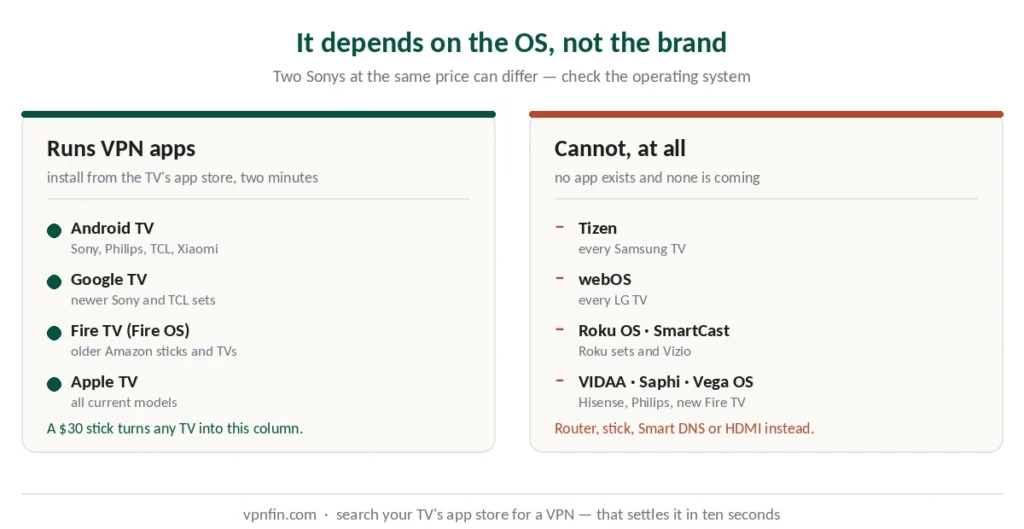
Whether your television can run a VPN has nothing to do with its brand and everything to do with its operating system. A Sony running Android TV installs a VPN app in two minutes. A Samsung of the same price cannot install one at all. Our page on PureVPN on Android TV covers code sign-in, split tunnelling modes and fixes.
Find out which camp yours is in first — it decides everything else on this page.
The Split
These run VPN apps natively: Android TV, Google TV, Fire TV on Fire OS, and Apple TV since tvOS 17.
These cannot, at all: Samsung (Tizen), LG (webOS), Roku, Vizio SmartCast, Hisense VIDAA, Philips Saphi.
⚠️ One recent change worth knowing: Amazon’s newer Fire TV sticks run Vega OS, which cannot sideload apps and supported no VPNs at launch. Amazon enabled VPN apps in late November 2025, and NordVPN, IPVanish, Surfshark, ExpressVPN and Proton VPN now offer Vega versions, so guides written a year ago describe the wrong thing.
How to Check Which You Have
By brand, roughly: Samsung means Tizen. LG means webOS. Sony, Philips, TCL and Xiaomi usually mean Android TV or Google TV. Hisense varies — some run VIDAA, some Android TV. Our guide to VPN for Android TV covers apps, sign-in codes and what to check.
To be certain: go into your TV’s settings and look for About, Support or System Information. The OS name appears there.
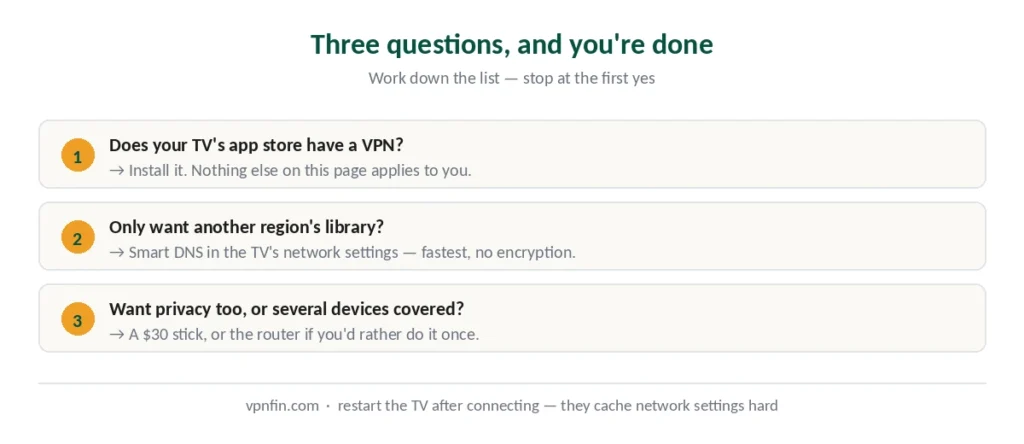
Quickest test of all: open the TV’s app store and search for a VPN by name. Anything from NordVPN or ExpressVPN means you can install it. Nothing at all means your TV is in the second group. Before trusting any new service, test it the way our JamboVPN safety check describes.
If Your TV Runs VPN Apps
Straightforward, and no different from installing anything else.
Open the Google Play Store or Amazon Appstore on the TV, search for your provider, install, sign in, pick a server, connect.
⚠️ Watch the device limit. Your TV counts as one connection. With CyberGhost capping at seven, a TV plus two phones plus two laptops plus a tablet leaves you one slot.
| Provider | Simultaneous | Notes |
|---|---|---|
| NordVPN | 10 | — |
| Surfshark | Unlimited | no cap in terms |
| ExpressVPN | 10/12/14 | by tier |
| CyberGhost | 7 | router counts as one |
| PureVPN | 10 | up to 50 with paid add-on |
| IPVanish | Unlimited | no cap on any plan |
| Windscribe | Unlimited | including Build a Plan |
| Private Internet Access | Unlimited | no tier gating |
| Mullvad | 5 | no paid add-on |
| TunnelBear | Unlimited | no cap on any plan |
| Norton VPN | 5 | 10 on Ultimate, US only |
| Hotspot Shield | Disputed | sources give five and ten |
| IVPN | 5 | 10 on Pro Suite |
| PrivadoVPN | 10 | 1 on the free tier |
| StrongVPN | 12 | more than either market leader |
| PrivateVPN | 10 | free dedicated IP on one plan |
| VyprVPN | Disputed | sources give five and ten |
| Astrill | 5 or unlimited | sources disagree; Astrill's page says unlimited in the household |
| TorGuard | 8, 12 or 30 | by plan |
| ZoogVPN | 10 | 1 on the free tier; some reviews say unlimited |
| FastestVPN | 10 | 15 on the PRO lifetime plan |
| Hide.me | 10 | 1 on the free tier |
If It Can’t — Four Ways Round
1. Add a streaming stick
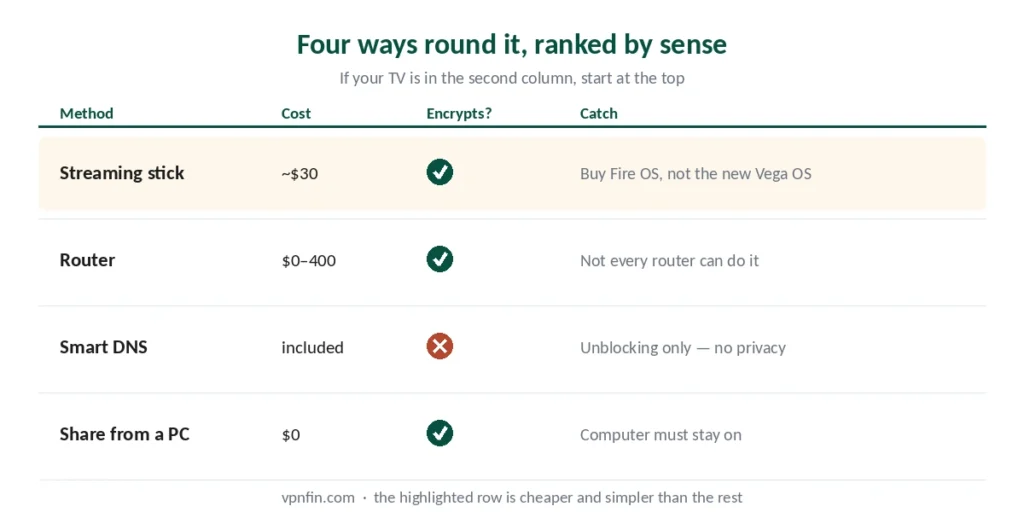
The cheapest fix, and the one most guides bury. A Fire TV Stick costs around $30, plugs into any HDMI port, and runs VPN apps natively. Your Samsung becomes a screen; the stick does the work.
Cheaper than a router, easier than any configuration, and it upgrades the TV’s software at the same time.
⚠️ Fire OS and the newer Vega OS sticks both run the major VPN apps now; Amazon enabled them on Vega in late November 2025. Which models are which, and what works on each is covered separately, and the two systems differ in how you switch a VPN off on the stick.
2. Router
Configure the VPN on your router and every device behind it is covered — TV, consoles, everything. The TV needs no setup at all.
This is the universal answer that works with Tizen, webOS, SmartCast, Roku OS and every other platform. It also counts as one connection regardless of how many devices sit behind it.
The catch is difficulty in both directions: not every router supports it, and our router guide covers the three paths, including the one that can permanently break your hardware. ⚠️ Undoing it has its own order of operations — get that wrong and the television is the least of what goes offline.
3. Smart DNS
Changes what region streaming services think you’re in, without encrypting anything.
No privacy benefit, no security benefit, no speed penalty. It exists purely for unblocking, and unlike a full VPN it can be configured in the TV’s own network settings on Samsung and LG.
ExpressVPN’s version is MediaStreamer, which the company explicitly recommends for Samsung and LG sets. NordVPN includes SmartPlay. We compare them directly in our Smart DNS and VPN comparison.
⚠️ Streaming platforms have got better at detecting DNS manipulation, so this works less reliably than it did.
4. Share a connection from a computer
Connect your PC to the VPN and share that connection over Wi-Fi or Ethernet, then connect the TV to it. Works, but the computer must stay on the whole time. Our guide to IPVanish on Smart TV covers which TVs get the app, and why LG and Samsung need a router.
The blunt version of the same idea: plug a laptop into the TV by HDMI and let the TV be a monitor. Chromecast has the same split — newer models run apps, older ones only mirror.
Which VPN to Pick
Three things matter, and only one of them is speed.
Native app for your TV’s OS, if it has one. All five providers we rank publish Android TV apps.
Smart DNS included in the subscription, if your TV can’t run apps. This is what lets the same subscription cover a Samsung set. ExpressVPN and NordVPN both include it.
Device limit that survives your household. A TV, a stick, phones and laptops add up quickly — Surfshark’s unlimited connections remove the arithmetic entirely.
What Speed Actually Costs You
On speed: modern providers retain 89–95% of your connection according to published testing, and 4K needs 25 Mbps. If your internet handles 4K without a VPN, it will handle it with one. Our guide to Windscribe on Smart TV covers apps for Google TV, Fire TV and Apple TV, a router for the rest. A VPN router covers every TV in the home at once, as our Aircove review explains.
What Actually Goes Wrong
The app installs but streaming still blocks you. Switch servers within the same country — platforms block individual servers, not whole providers. Once one works, stay on it for the session. Some platforms are harder than others — Hulu checks cookies and device state as well as your IP.
Streaming feels sluggish. Pick a server closer to home, and check whether your provider supports WireGuard on that platform. Our guide to Proton VPN on Smart TVs covers Android, Google, Fire and Apple TV, plus Samsung and LG.
When It Stops Working Suddenly
Nothing loads at all. Try restarting the TV after connecting. Smart TVs cache network settings aggressively and often need a reboot to notice the change. A Smart DNS address that no longer answers produces the identical symptom, and switching it off is a separate job.
It worked yesterday and doesn’t today. Normal in this category — platforms and providers trade moves constantly. Our streaming guide covers which providers hold up best.
Using one of the big three? Our provider guides walk through setup and the usual faults step by step: NordVPN on Smart TV, Surfshark on Smart TV and ExpressVPN on Smart TV.
Brand and device guides: Samsung TV and LG TV for sets without VPN apps, plus Nvidia Shield and Onn 4K for boxes that run them.
How We Research
This guide draws on published documentation from TV manufacturers and VPN providers, technical guides from named sources including TheBestVPN, Gizmodo and NordVPN’s own support pages, and our full reviews of the providers we rank — cross-checked and verified at publication. Where platform support has changed recently, as with Amazon’s Vega OS devices, we flag it. Our full approach lives on the About Us page.
Smart TV VPN FAQ
No. Samsung televisions run Tizen, which does not support VPN applications and offers no way to install them. Your options are a streaming stick plugged into an HDMI port, configuring the VPN on your router, using Smart DNS through the TV’s network settings, or sharing a VPN connection from a computer.
Those running Android TV, Google TV, Fire TV on Fire OS, or Apple TV. Sony, Philips, TCL and Xiaomi sets commonly use Android TV or Google TV. Samsung’s Tizen, LG’s webOS, Roku, Vizio SmartCast, Hisense VIDAA and Philips Saphi do not. Amazon’s newer Vega OS sticks also run VPN apps, installed from the Amazon Appstore.
A streaming stick. A Fire TV Stick costs around $30, plugs into any HDMI port, and runs VPN apps natively — cheaper than a VPN router and far simpler than flashing firmware. Both Fire OS and the newer Vega OS sticks now run the major VPN apps.
For unblocking regional content, it is faster and simpler. For anything else, no — Smart DNS changes which DNS servers you use and encrypts nothing, so it provides no privacy or security benefit. Streaming platforms have also become better at detecting it.
Rarely enough to matter. Published testing puts modern providers at 89–95% speed retention, and 4K streaming needs around 25 Mbps. If your connection handles 4K without a VPN, it will handle it with one. Choosing a nearby server minimises the impact.
The Short Version
Check your OS first. Android TV, Google TV, Fire OS and Apple TV run VPN apps. Samsung’s Tizen and LG’s webOS do not, and no provider can change that.
If yours can’t: a $30 streaming stick is the cheapest and simplest fix. A router is the most thorough. Smart DNS unblocks but protects nothing.
And know what you’re actually buying. If the goal is watching another region’s library, Smart DNS is faster and simpler. For privacy on a device that talks to a dozen services in the background, only a real VPN does that. Our page on PureVPN on Smart TV covers Samsung and LG workarounds and Android TV apps.