
Disclosure: VPNFin is reader-supported. If you buy a VPN through links on this page, we may earn a commission at no extra cost to you. This never affects our ratings — here’s our full disclosure.
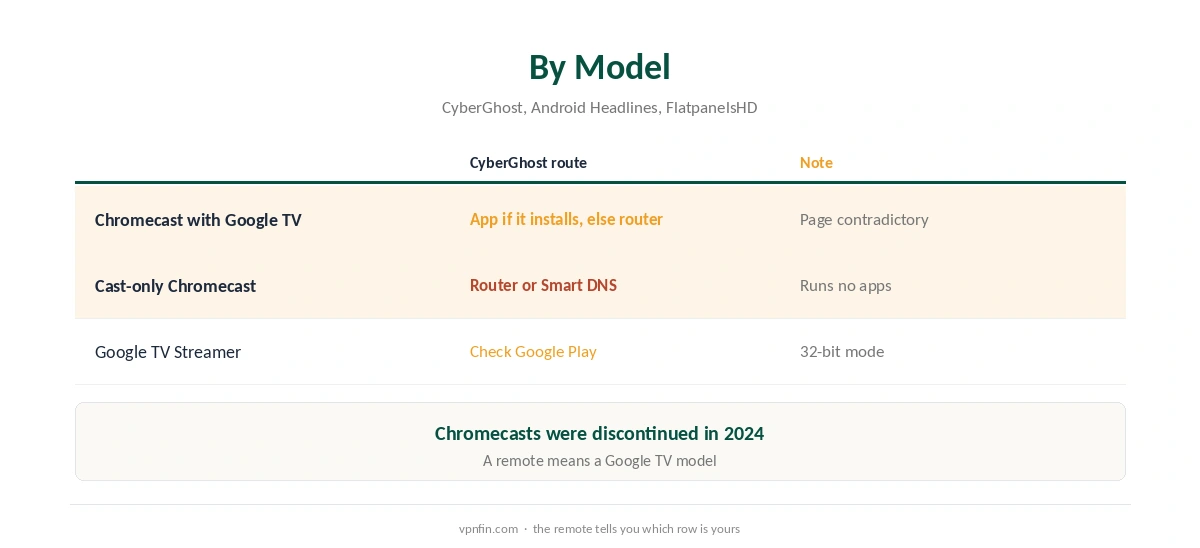
Chromecast CyberGhost setup depends on the model, and CyberGhost’s own page sends mixed signals. Its Android TV page lists Google TV as supported, which suggests the app should run on a Chromecast with Google TV. Yet the same page lists Chromecast with Google TV among devices to cover through a VPN-compatible router. The older cast-only Chromecast runs no apps at all, so it always needs a router.
This guide covers each model, how to check whether the app installs on yours, and why casting from a phone with CyberGhost does not work.
Which Chromecast Do You Have?
A Chromecast with Google TV has a remote and shows the Google TV home screen. A cast-only Chromecast has no remote and only receives video sent from a phone or computer. Google replaced both with the Google TV Streamer in 2024, Android Headlines reports. Our Chromecast VPN guide compares other providers.
Checking for the App on Google TV
Because CyberGhost’s page contradicts itself, check Google Play on your Chromecast with Google TV. Search for CyberGhost. If the app appears and installs, use it; our CyberGhost Android TV guide covers the TV app, which needs Android TV 7.0 or later according to CyberGhost.
If the app does not appear, or will not install, use the router route below. That is the route CyberGhost’s page itself suggests for this device.
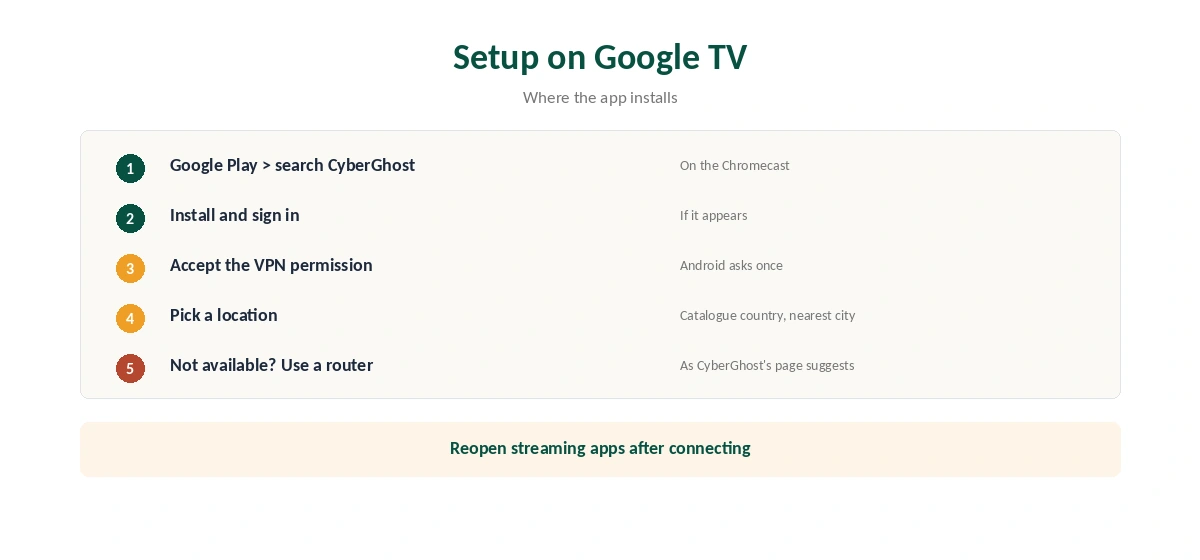
Chromecast CyberGhost Setup on Google TV
Where the app installs, sign in, accept the Android VPN permission, and pick a location. Then open your streaming app. If the catalogue does not change, close the app fully and reopen it, since TV apps cache location.
For streaming, choose the country of the catalogue you need and the nearest city within it. If one server gets blocked, try another city in the same country before changing anything else.
Cast-Only Chromecasts: Use a Router
A cast-only Chromecast cannot install apps, so CyberGhost has to run on the router. ASUS routers on recent firmware include CyberGhost in VPN Fusion, and other routers use OpenVPN files, as our CyberGhost router guide explains. Every device behind the router then uses the tunnel.
Smart DNS set on the router is a lighter option for streaming. CyberGhost offers it for Germany, Japan, the Netherlands, the UK and the US, but it changes only DNS and adds no encryption, as our CyberGhost smart TV guide explains.
Why Casting From a VPN Phone Fails
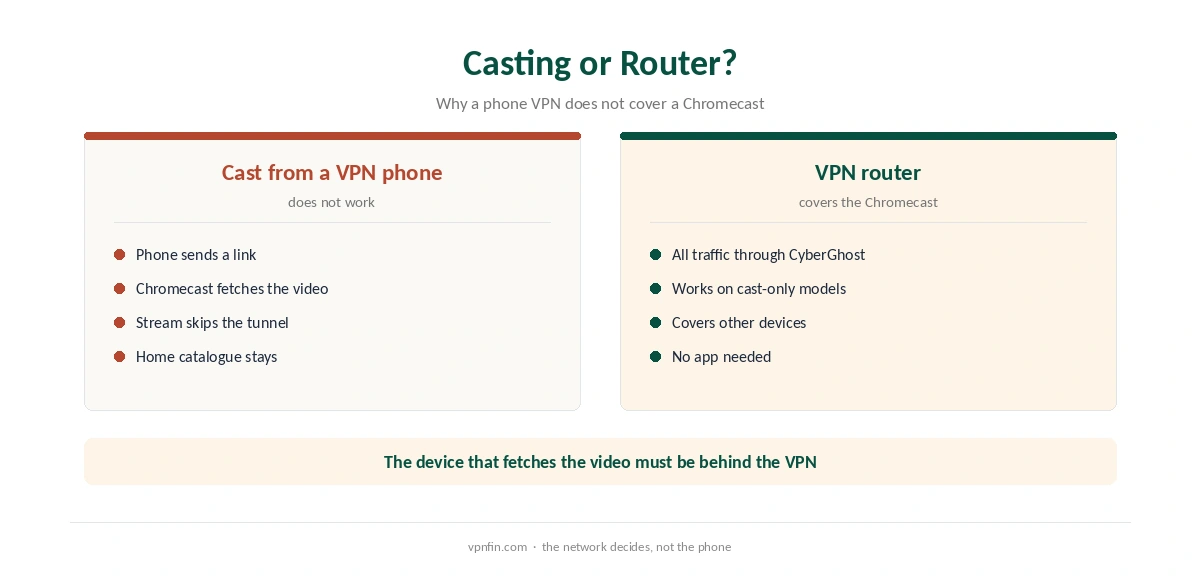
When you cast, the phone sends the Chromecast a link to the video. The Chromecast then fetches the stream itself over your home network. So a phone running CyberGhost does not change what the Chromecast sees; the service sees your home IP and serves your home catalogue.
Only a VPN on the Chromecast itself, or on the router it uses, changes that.
Testing the Setup
For a router or Smart DNS setup, check the public IP from a phone on the same network with our VPN test page. For the app, open a streaming service and confirm the catalogue changed. Run a DNS check with our DNS leak guide once, since a leaking request can show the real country.
Other TV Devices
If the Chromecast route proves awkward, a Fire TV Stick runs CyberGhost directly on Fire OS 6 and later, as our CyberGhost Firestick guide explains. Roku has the same limits as a cast-only Chromecast, covered in our CyberGhost Roku guide.
Google TV Streamer
The Google TV Streamer runs Google TV, so check Google Play on it the same way. FlatpanelsHD notes it runs Android in 32-bit mode, which can limit some apps. Our Google TV Streamer guide covers the device.
Choosing a Location
Pick the country of the catalogue you watch most, then the nearest city within it for speed. A router or Smart DNS setup applies one region to every device behind it, so households that need different regions on different screens may prefer the app where it installs, or ASUS VPN Fusion, which lets you choose devices individually.
What CyberGhost Costs
CyberGhost renews at $56.94 a year on its 2-year plan, according to our renewal table. It covers seven devices. The 45-day money-back guarantee applies to website purchases, as our CyberGhost refund guide explains, which gives time to check whether the app runs on your Chromecast.
| Provider | Renewal price | Per month | Tier |
|---|---|---|---|
| NordVPN | $139.08/yr | ~$11.59 | Basic |
| Surfshark | ~$79/yr | ~$6.58 | Starter |
| ExpressVPN | $99.95/yr | ~$8.33 | Basic |
| CyberGhost | $56.94/yr | ~$4.75 | 2-year |
| PureVPN | $47.95/yr | ~$4.00 | Standard, 2-year (1-year renews $57.95) |
| IPVanish | $89.99/yr | ~$7.50 | Essential |
| Windscribe | ~$69/yr | ~$5.75 | Pro |
| Proton VPN | ~$83.88/yr | ~$6.99 | VPN Plus |
| Mullvad | ~$65/yr | ~$5.40 | flat, no tiers |
| Norton VPN | $79.99/yr | ~$6.67 | Standard |
| Hotspot Shield | ~$95.99/yr | ~$8.00 | Premium annual |
| Astrill | $300 every 2 yrs | ~$12.50 | 2-year, same at renewal |
Related Guides
Our NordVPN Chromecast guide and Surfshark Chromecast guide cover two Nord Security brands with apps that run on Google TV. Both are worth a look if a native app on the Chromecast matters to you.
Our PureVPN Chromecast guide covers another provider. CyberGhost belongs to Kape Technologies, which also owns ExpressVPN and Private Internet Access.
How We Research
This page draws on CyberGhost’s Android TV download page, Android Headlines on the Google TV Streamer, FlatpanelsHD, CyberGhost’s console guide for Smart DNS regions and our renewal table. We cross-checked these sources against each other, and where they conflict or something can’t be verified, we say so in the text rather than guessing. We checked time-sensitive figures, including prices in US dollars, on 6 October 2026. Renewal from our renewal table. The main source we relied on is CyberGhost’s Android TV page. Our full approach lives on the About Us page.
Chromecast CyberGhost FAQ
Check Google Play on the device. CyberGhost’s page lists Google TV as supported but also suggests a router.
Only through a router running CyberGhost or Smart DNS, since it runs no apps.
No. The Chromecast fetches the stream itself, so the phone’s VPN does not cover it.
Set it on the router. It changes region for streaming but adds no encryption.
Check Google Play on it. FlatpanelsHD notes its 32-bit mode can limit some apps.
The Verdict
Chromecast CyberGhost setup starts with checking Google Play on a Google TV model, and falls back on a router for cast-only models or if the app will not install. Casting from a VPN phone does not change the Chromecast’s location.