
Disclosure: VPNFin is reader-supported. If you buy a VPN through links on this page, we may earn a commission at no extra cost to you. This never affects our ratings — here’s our full disclosure.
Until 2023, running a VPN on an Apple TV meant configuring your router, setting up Smart DNS, or mirroring from a phone. tvOS 17 changed that by allowing third-party VPN apps, and the obvious conclusion is that the problem is solved. For a direct head-to-head, see our Smart DNS and VPN comparison.
It is not, for two reasons. Only about a dozen providers have shipped a tvOS app, and several of the services we cover are not among them — CyberGhost, TunnelBear and Hotspot Shield have none at all, and neither do PureVPN or Mullvad. Our page on Hotspot Shield on Apple TV covers the missing tvOS app and the workarounds.
Meanwhile the fallbacks are disappearing. Surfshark discontinued its Smart DNS, and ExpressVPN stopped supporting its router app on anything but its own hardware in March 2026. This guide covers who has an app, what to do if your Apple TV is too old to run one, and which paths still work. Our page on Astrill on Apple TV covers why there is no tvOS app and the router and VPN sharing routes.
The Short Answer
Best overall: NordVPN — a polished tvOS app plus Smart DNS as a backup for older hardware.
Best for streaming breadth: ExpressVPN — a native app and MediaStreamer, with the widest unblocking record.
Best for a household: Surfshark — a native app and unlimited devices, though its Smart DNS is gone.
Best free option, with a caveat: Proton VPN — a native tvOS app on the free tier that cannot stream.
Does Your Apple TV Support Apps at All?
Check this before anything else, because it decides which half of the guide applies to you.
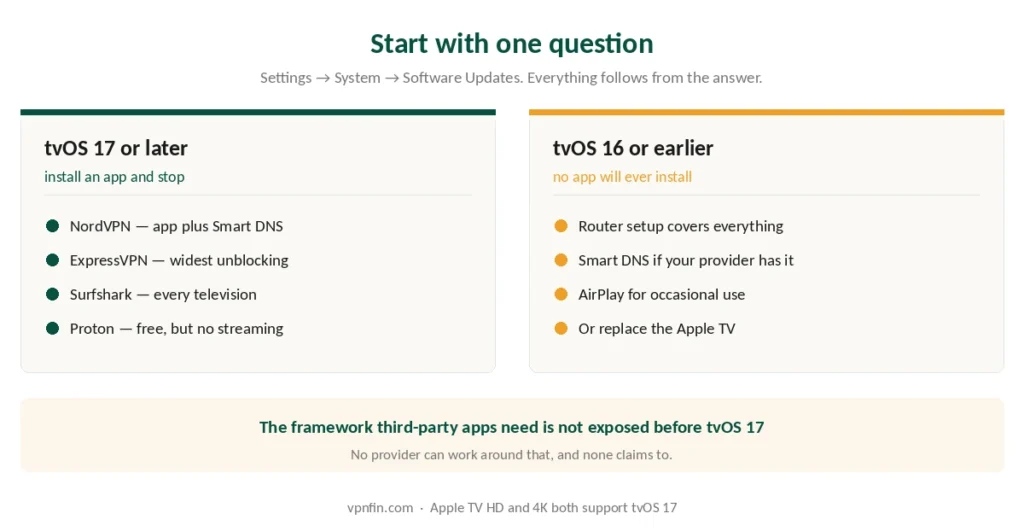
tvOS 17 or later: Settings → System → Software Updates. If you are on 17 or above, you can install a VPN from the App Store like any other app.
tvOS 16 or earlier: the operating system does not expose the tunnel framework third-party apps need. No app will install, and no provider can work around it. You are back to router configuration or Smart DNS. Our page on TorGuard on Apple TV covers why there is no tvOS app and the router routes instead.
⚠️ Apple TV HD and Apple TV 4K both support tvOS 17. If your device cannot update to it, it predates both, and a router setup is the realistic path — our router guide covers which firmware handles it.
Who Actually Has an App
This is the part most guides skip, because listing absences is less useful to them than listing options.
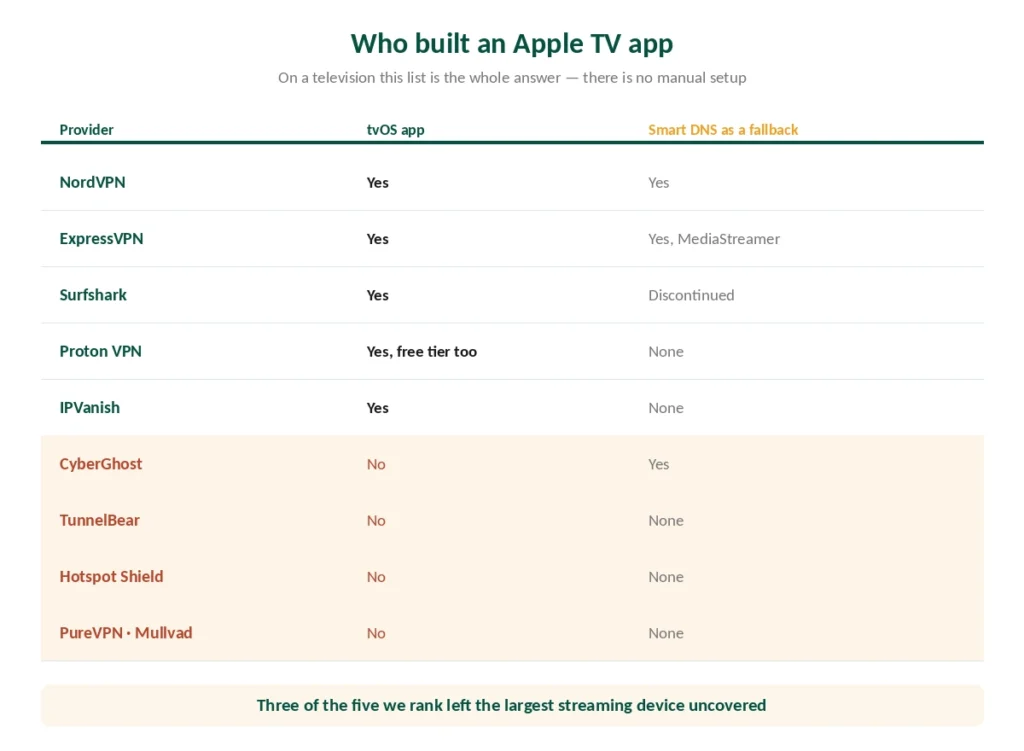
Among the providers we cover, these ship a native tvOS app: NordVPN, ExpressVPN, Surfshark, Proton VPN, Private Internet Access, IPVanish and Windscribe. Our guide to Windscribe on Apple TV covers the native tvOS app, setup and the free plan.
These do not: CyberGhost, TunnelBear, Hotspot Shield, PureVPN and Mullvad.
⚠️ That matters more on a television than anywhere else. On a phone or laptop, a provider without a dedicated app can still be configured manually. On an Apple TV there is no manual configuration — either the app exists or you are setting up your router.
Across the whole market roughly a dozen providers have built one, out of the hundreds that exist. A tvOS app is expensive to make and hard to sell, so most did not bother.
The Workarounds Are Closing
Two changes in 2026 narrowed the options for anyone without a native app, and hardly anyone reported either.
Surfshark discontinued its Smart DNS. That was the standard route for televisions and consoles that cannot run a VPN, and it is gone. Its native tvOS app covers Apple TV, but older models are left without a path.
ExpressVPN stopped supporting its router app on third-party routers as of 31 March 2026. Manual configuration and MediaStreamer still work, Aircove owners keep their support, and new buyers now get Fortify, the router ExpressVPN launched with GL.iNet in September 2026 — but the easy route on a Netgear or Linksys box has closed. Our page on TunnelBear on Apple TV covers why neither an app nor router support exists, and the alternatives.
⚠️ Smart DNS is not a VPN. It changes what a streaming service thinks your location is without encrypting anything, which is why it works on devices that cannot run tunnels. For streaming it is often enough; for privacy it does nothing, as what a VPN actually hides explains.
1. NordVPN — Best Overall for Apple TV
A native tvOS app plus Smart DNS, which means it works on both the current generation and older hardware. Few providers still offer both.
Fastest in CNET’s testing at 2.9% average download loss, which matters for 4K HDR more than for browsing. Ten simultaneous devices, six published no-logs audits, and reliable streaming access across major services.
The catch: renewal reaches $139.08 a year. Our NordVPN review has the full picture.
2. ExpressVPN — Widest Streaming Access
MediaStreamer is the strongest Smart DNS implementation among providers we cover, and the tvOS app is well regarded. Published testing puts it ahead on the number of regional catalogues it opens.
Renewal is $99.95 a year. Note the router change above if that was your intended setup. Our ExpressVPN review covers the audit record.
3. Surfshark — Best for a Household
Unlimited simultaneous connections and a native tvOS app, so every television in the house is covered on one subscription at around $79 a year on renewal.
The Smart DNS is gone, which only matters if you also have older hardware. Our Surfshark review sets it against the rest.
4. Proton VPN — The Free App With an Asterisk
Proton ships a native tvOS app and its free tier is permanent, with no data cap. On paper that is a free VPN for your Apple TV. For four workarounds for the missing tvOS app, see our page on CyberGhost on Apple TV.
⚠️ The free tier does not support streaming. Proton says so plainly, and streaming is the reason people put a VPN on a television. The app is genuine; the use case is not.
Paid plans unblock ten or more Netflix regions and cover ten devices. Our Proton VPN review has the detail.
5. IPVanish — Simplest Setup
A native tvOS app with unlimited connections, and reviewers consistently describe the setup as the least fiddly of the group. Our guide to IPVanish on Apple TV covers a native app, now with WireGuard.
Fewer published audits than the providers above, and no partner programme we could join, so this recommendation earns us nothing. Our IPVanish review covers where it stands.
If Your Provider Has No App
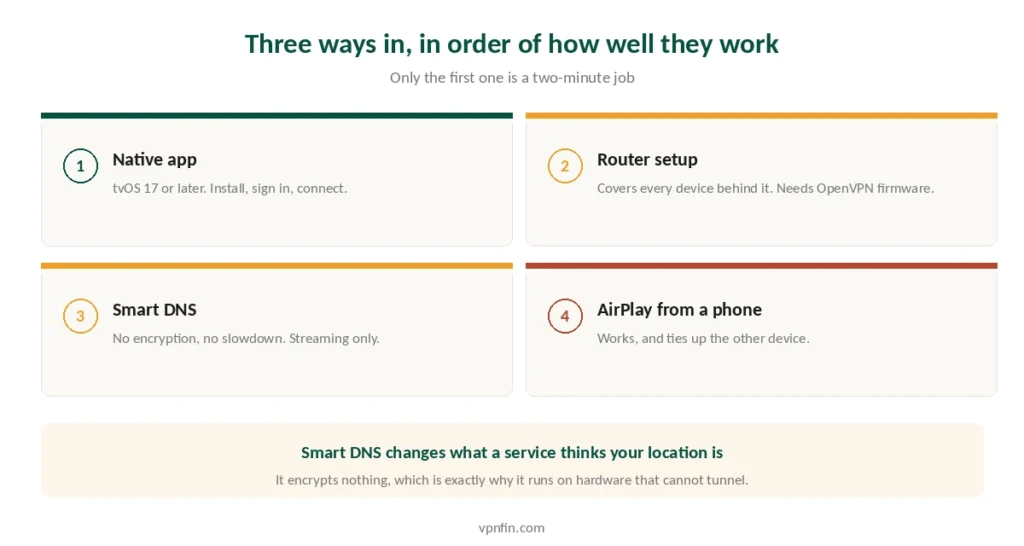
Three routes remain, in order of how well they work.
Router configuration. Install the VPN on your router and it covers every device behind it, Apple TV included. Router setup is the most reliable method and the most work — our router guide covers compatible firmware and the OpenVPN requirement, which matters because some providers have retired OpenVPN entirely.
Smart DNS. Faster to set up and does not slow your connection, since nothing is encrypted. NordVPN and ExpressVPN still offer it; Surfshark does not. Our guide to Mullvad on Apple TV covers the missing tvOS app and the router route that works.
AirPlay from a phone or Mac. Run the VPN on an iPhone or MacBook and mirror to the Apple TV. This works, though it ties up the other device, and the quality depends on your local network. Acceptable for occasional use rather than as a setup. For Apple tablets, see our NordVPN on iPad guide.
⚠️ Sharing a connection from a laptop over Wi-Fi is sometimes suggested. That method works on macOS and stays fragile, so treat it as a last resort rather than a plan.
Free VPNs on Apple TV
Six free services have shipped tvOS apps: hide.me, Hola, PrivadoVPN, Proton VPN, Windscribe and X-VPN.
⚠️ Most of them will not do what you want. Free tiers are the first thing streaming platforms block, because their address ranges are small and heavily used — our Netflix guide explains the mechanism. Proton’s free tier excludes streaming by design.
Windscribe’s free tier is the one with a realistic chance, at 10 GB a month across ten countries. Ten gigabytes is roughly four hours of HD video, so it is an evaluation rather than a solution. Our free VPN guide covers which free tiers are safe at all.
Using one of the big three? Our provider guides walk through setup and the usual faults step by step: NordVPN on Apple TV, Surfshark on Apple TV and ExpressVPN on Apple TV.
Need the VPN off for a local app? Our Apple TV guide covers the app button, Connect on Demand and router setups.
How We Research
This guide draws on provider documentation of tvOS app availability, published testing of native Apple TV apps from named reviewers including Top10VPN, CyberInsider and TheBestVPN, Apple’s own tvOS requirements, and contemporaneous reporting on Surfshark’s Smart DNS discontinuation and ExpressVPN’s router support change — cross-checked and verified at publication. We don’t run our own streaming tests, and we list which providers lack a tvOS app rather than only those that have one, because on a television that absence is the whole answer. Our full approach lives on the About Us page.
Apple TV VPN FAQ
Yes, if the device runs tvOS 17 or later. Apple opened third-party VPN support with that release, and apps install from the App Store like any other. Older versions do not expose the framework those apps need, so no provider can work around it — a router setup is the alternative.
Among the providers we cover: NordVPN, ExpressVPN, Surfshark, Proton VPN, Private Internet Access, IPVanish and Windscribe. CyberGhost, TunnelBear, Hotspot Shield, PureVPN and Mullvad do not. Across the wider market only about a dozen providers have built one, since a tvOS app is expensive to develop and hard to sell.
Six free services ship tvOS apps: hide.me, Hola, PrivadoVPN, Proton VPN, Windscribe and X-VPN. Most will not unblock streaming, because platforms block free address ranges quickly. Proton’s free tier excludes streaming by design, so Windscribe’s 10 GB monthly allowance is the more realistic free option.
It does where providers still offer it. NordVPN and ExpressVPN both ship Smart DNS; Surfshark discontinued its own. Smart DNS changes what a streaming service thinks your location is without encrypting your traffic, which is why it runs on hardware that cannot handle a tunnel.
Three options remain. Install the VPN on your router, which covers every device behind it. Use Smart DNS if your provider offers it. Or run the VPN on an iPhone or Mac and AirPlay to the television, which works but ties up the other device.
The Verdict
Check your tvOS version first. On 17 or later, install an app and you are finished in two minutes. On 16 or earlier, no app will work and you are configuring a router.
Then check whether your provider built one. Every provider in our current top five did, but several of the services we cover did not, and on an Apple TV there is no manual fallback — which makes this the one device where the app list matters more than the speed test.
NordVPN if you want both routes covered, ExpressVPN for the widest streaming access, Surfshark for a house full of televisions, Proton VPN if you are testing and can live without streaming. Our page on PureVPN on Apple TV covers the native tvOS app and the router route.