
Disclosure: VPNFin is reader-supported. If you buy a VPN through links on this page, we may earn a commission at no extra cost to you. This never affects our ratings — here’s our full disclosure.
A CyberGhost iPhone subscription can start with the longest trial CyberGhost offers anywhere: 7 days, against 24 hours on a computer. The catch is that the trial runs through the App Store, so refunds after it follow Apple’s rules, not CyberGhost’s 45-day guarantee. That choice, made in the first minute, shapes everything after it.
This guide covers the trial, the setup, what the iPhone app leaves out compared with Android and Windows, and the iOS settings that stop a VPN from connecting.
Is CyberGhost Good on iPhone?
It is a solid, simple app with a short feature list. CyberGhost supports iOS 15 through iOS 26 on iPhone, iPad and iPod touch. The app offers WireGuard and IKEv2, an automatic kill switch and automatic protection on new Wi-Fi networks. However, Tom’s Guide lists the iOS app as a weak point of CyberGhost, and split tunnelling is missing. Our page on CyberGhost IKEv2 covers where the protocol works and when to choose it.
The 7-Day CyberGhost iPhone Trial
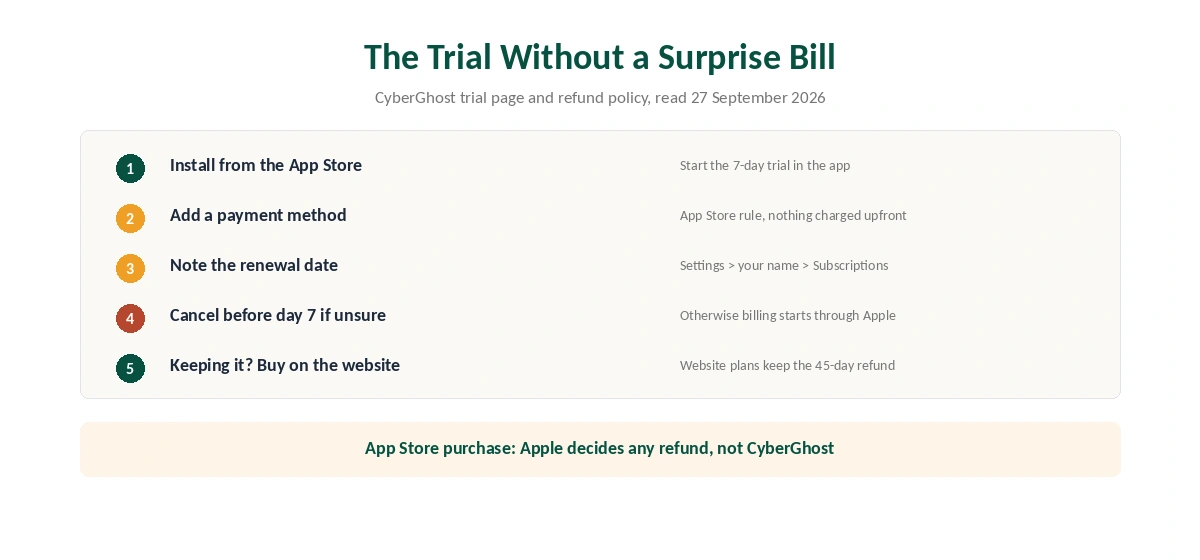
CyberGhost’s trial page lists 7 days on iOS, 3 days on Android and 24 hours on Windows and macOS. On a phone, the trial needs a payment method under App Store rules, although Apple charges nothing upfront. If you do not cancel before the trial ends, the subscription starts through Apple.
That is where the trap sits. CyberGhost’s refund policy excludes in-app purchases through the App Store, so Apple decides any refund. By contrast, a plan bought on CyberGhost’s website keeps the 45-day window. Our CyberGhost refund guide explains the website request.
So the trial suits a quick test. To keep the service, either cancel the App Store trial and buy on the website, or accept Apple’s refund terms. In iOS, active subscriptions sit under Settings, then your name, then Subscriptions.
How to Set Up CyberGhost on iPhone
Setup takes a few minutes. First, install CyberGhost VPN from the App Store and open it. Then sign in with your account, or start the trial if you have none. Next, iOS asks you to allow a VPN configuration; approve it with Face ID or your passcode.
After that, tap Connect for the fastest server or pick a country. The app groups servers by country and lets you save favourites, according to CyberGhost’s iOS page. Finally, check the result on our VPN test page before you rely on it.
What the CyberGhost iPhone App Leaves Out
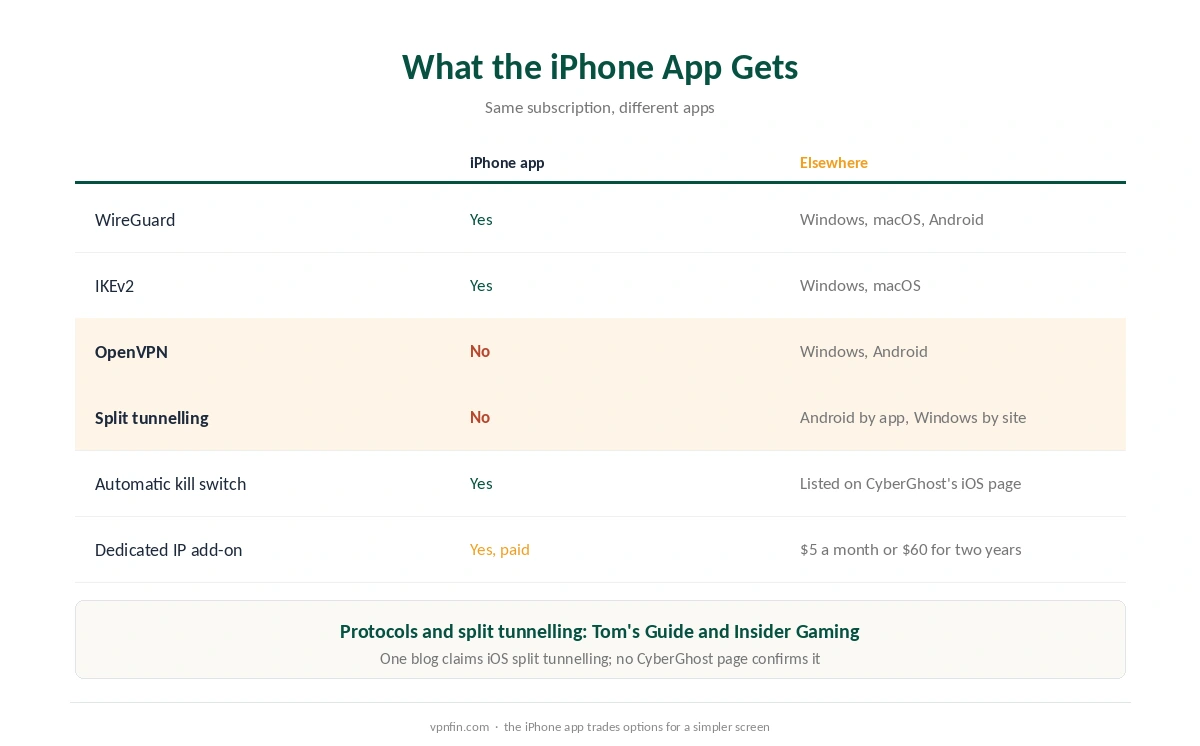
CyberGhost’s apps differ by platform, and the iPhone version has fewer options than Windows or Android. In Tom’s Guide’s review, iOS offers WireGuard and IKEv2, while Windows adds OpenVPN. Android, meanwhile, has full split tunnelling by app. Insider Gaming reports the same two iOS protocols and no iOS split tunnelling.
One blog, Impulsec, claims the iPhone app has split tunnelling. We found no CyberGhost page that confirms it, so we side with Tom’s Guide and Insider Gaming. If you need certain apps outside the tunnel, our split tunnelling guide explains the options.
What the app does include is useful. The automatic kill switch blocks traffic if the VPN drops, as our kill switch explainer describes. Automatic Wi-Fi protection connects on new networks such as cafés. A dedicated IP costs extra, from $5 a month or $60 for two years, and our dedicated IP guide covers when it helps.
Why CyberGhost Won’t Connect on iPhone
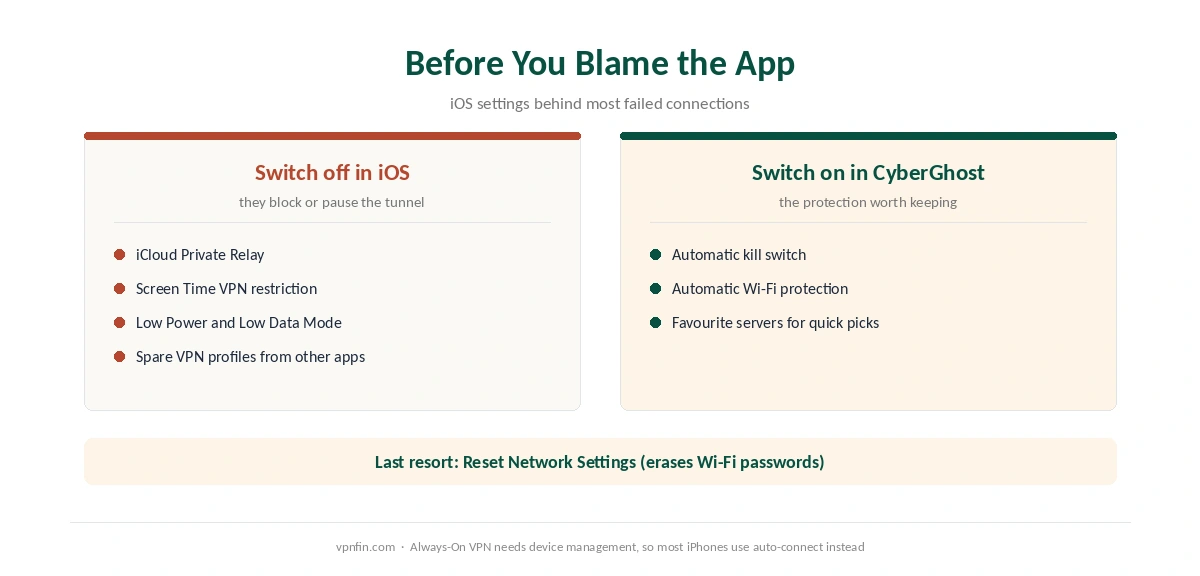
Most iPhone failures come from iOS settings rather than the app. First, turn off iCloud Private Relay, since it conflicts with any VPN; our Private Relay guide shows where. Second, check Screen Time: a Content and Privacy restriction can block VPN changes.
Third, Low Power Mode and Low Data Mode can pause the tunnel when the screen locks. Fourth, a leftover profile from another VPN app can clash, so remove spares under General, VPN and Device Management. If none of that works, Reset Network Settings helps, although it erases saved Wi-Fi passwords.
Our iPhone VPN troubleshooting page lists these checks in order. Also, turning the VPN off is the fastest way to test whether CyberGhost causes a problem at all.
Always-On VPN and Auto-Connect
CyberGhost’s iOS FAQ addresses Always-On VPN directly. Apple supports that mode mainly on managed devices, and CyberGhost notes that most users will not use it directly. Instead, the CyberGhost iPhone app can auto-protect chosen networks and trigger connections by its own rules. For travel or public Wi-Fi, that automatic rule matters more than any protocol choice.
What CyberGhost Costs on iPhone
Oddly, the iOS download page showed the lower of two prices on 5 October 2026: $1.99 a month on the 26-month plan, billed $51.74. Other CyberGhost pages showed $2.19, billed $56.94. After 26 months, the plan renews yearly at its first bill, so the cheaper grid also renews cheaper.
The 6-month plan costs $41.94 and the monthly plan $12.99. One plan covers 7 devices, which fits an iPhone, an iPad and a Mac with room to spare. Our CyberGhost price breakdown compares the plans over four years.
| Provider | Renewal price | Per month | Tier |
|---|---|---|---|
| NordVPN | $139.08/yr | ~$11.59 | Basic |
| Surfshark | ~$79/yr | ~$6.58 | Starter |
| ExpressVPN | $99.95/yr | ~$8.33 | Basic |
| CyberGhost | $56.94/yr | ~$4.75 | 2-year |
| PureVPN | $47.95/yr | ~$4.00 | Standard, 2-year (1-year renews $57.95) |
| IPVanish | $89.99/yr | ~$7.50 | Essential |
| Windscribe | ~$69/yr | ~$5.75 | Pro |
| Proton VPN | ~$83.88/yr | ~$6.99 | VPN Plus |
| Mullvad | ~$65/yr | ~$5.40 | flat, no tiers |
| Norton VPN | $79.99/yr | ~$6.67 | Standard |
| Hotspot Shield | ~$95.99/yr | ~$8.00 | Premium annual |
| Astrill | $300 every 2 yrs | ~$12.50 | 2-year, same at renewal |
Who Should Use CyberGhost on iPhone
CyberGhost iPhone use makes sense for someone who wants a plain app with a kill switch and automatic Wi-Fi protection. The 7-day trial also suits anyone who wants to test before paying. In addition, households with Apple and Windows devices can share one plan across seven of them. Our guide to PureVPN on iPhone covers OpenVPN support and the missing split tunnelling.
Who Should Pick Another App
Pick another app if you need split tunnelling on the phone, or OpenVPN for a network that blocks WireGuard. Our NordVPN iPhone guide covers an app that still offers OpenVPN. Split tunnelling is rare on iOS, though: our Proton VPN iPhone guide notes that Proton lacks it too. Also note the owner: CyberGhost belongs to Kape Technologies, a London-based company that also owns ExpressVPN and Private Internet Access. For a wider comparison, see our iPhone VPN guide.
How We Research
This page draws on CyberGhost’s iOS download page, trial page and refund policy. We also read Tom’s Guide’s CyberGhost review and Insider Gaming’s iPhone guide. We cross-checked these sources against each other, and where they conflict or something can’t be verified, we say so in the text rather than guessing. We checked time-sensitive figures, including prices in US dollars, on 5 October 2026. That day, CyberGhost showed two price grids on different pages. The main source we relied on is CyberGhost’s iOS download page. Our full approach lives on the About Us page.
CyberGhost on iPhone FAQ
Yes, 7 days through the App Store. It needs a payment method but charges nothing upfront. Cancel before day 7 under Settings, your name, Subscriptions, or the subscription starts through Apple.
Only through Apple. CyberGhost’s 45-day guarantee excludes App Store purchases. A plan bought on CyberGhost’s website keeps the 45-day window, or 14 days on the monthly plan.
Tom’s Guide and Insider Gaming both report that it does not. Split tunnelling by app is available on Android, and Windows can exclude websites.
WireGuard and IKEv2, according to Tom’s Guide and Insider Gaming. OpenVPN is available in CyberGhost’s Windows and Android apps but not on iOS.
Low Power Mode and Low Data Mode can pause background connections. Turn them off, then check that no Screen Time restriction or second VPN profile is interfering.
The Verdict
CyberGhost on iPhone is a dependable basic app with a generous trial. Yet the trial pulls you into App Store billing, where CyberGhost’s refund promise stops. Test for a few days, then decide where to buy. If you also use a Mac, our CyberGhost Mac guide covers that app.