
Disclosure: VPNFin is reader-supported. If you buy a VPN through links on this page, we may earn a commission at no extra cost to you. This never affects our ratings — here’s our full disclosure.
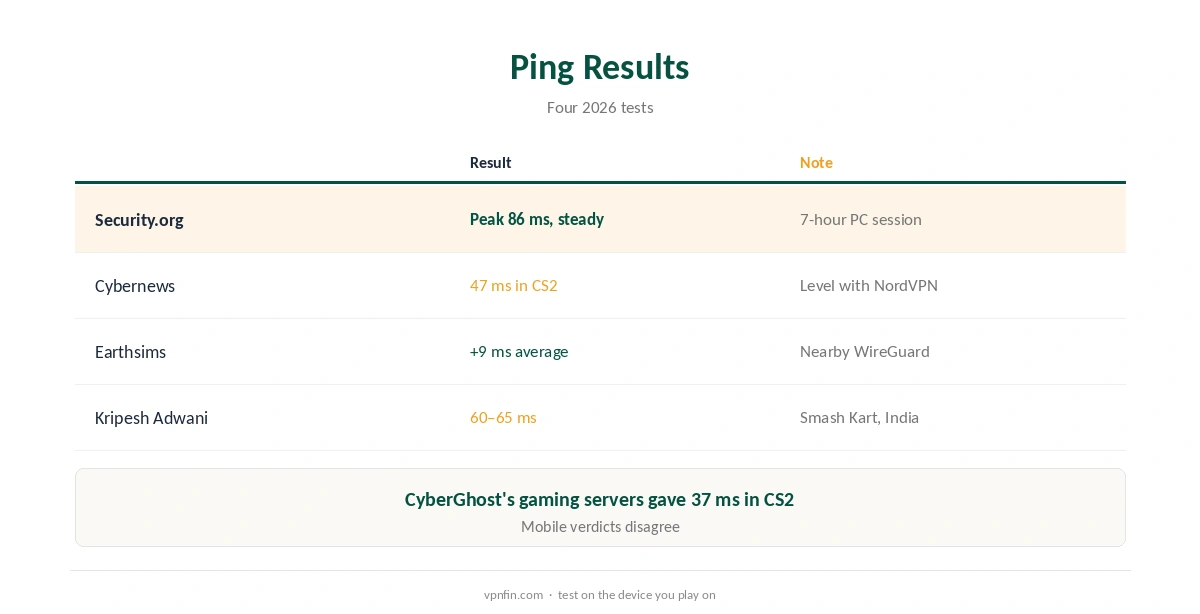
Surfshark for gaming earns its place through steady ping rather than special servers. Security.org named it the best VPN for PC gaming in 2026, after a seven-hour session where ping peaked at 86 ms and stayed consistent. Cybernews measured 47 ms in Counter-Strike 2, and Earthsims found an average increase of 9 ms on nearby servers. Surfshark has no dedicated gaming servers and no port forwarding.
This guide covers the test results, the setup, consoles, and what a VPN cannot fix.
What the Tests Found
Security.org’s 2026 gaming test praised consistency: ping never rose above 86 ms over seven hours, and stability matters more than a single low reading. Cybernews recorded 47 ms in Counter-Strike 2, level with NordVPN and behind CyberGhost’s 37 ms on its gaming servers. Earthsims measured an average 9 ms increase on nearby WireGuard servers.
Sources disagree on mobile. Security.org does not recommend Surfshark for mobile gaming, while VPNAlert calls it the best VPN for mobile gaming. Test on the device you actually play on.
Surfshark for Gaming Setup on PC
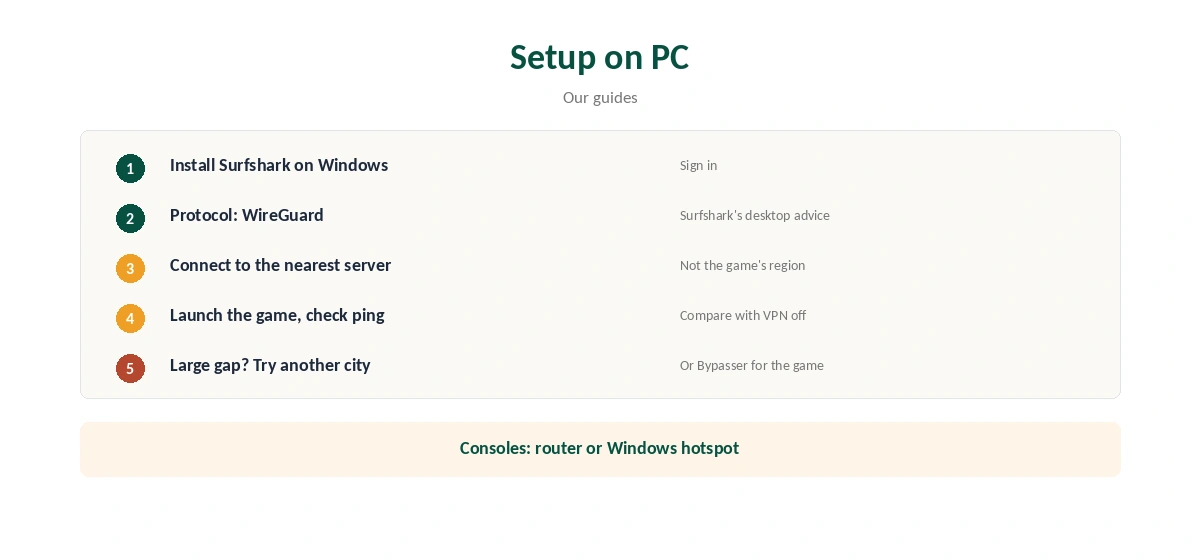
Install Surfshark on Windows and choose WireGuard, which Surfshark’s speed advice recommends on desktop, as our Surfshark WireGuard guide explains. Connect to the nearest server, launch the game and check ping in its network stats.
Compare with the VPN off. If the difference is small, keep the VPN for protection; if it is large, try another nearby city. Our Surfshark Windows guide covers the app.
Bypasser for Games
Bypasser, Surfshark’s split tunnelling, can keep a game outside the VPN while everything else stays protected. That helps when a game blocks VPN addresses or you need direct connections for hosting. Our split tunnelling guide explains the trade-off.
Consoles
Consoles cannot run VPN apps. Use a router running Surfshark or a Windows PC sharing its connection, as our Surfshark Xbox guide and PS5 guide explain. Surfshark’s Smart DNS, which older guides suggest, closed in February 2026.
DDoS Protection and Static IPs
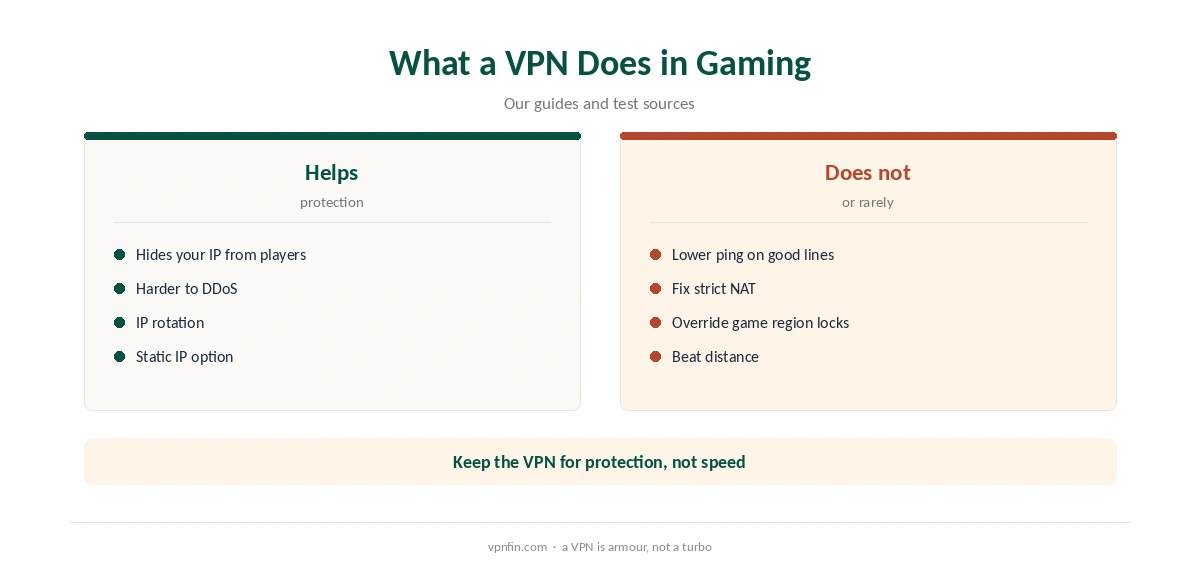
A VPN hides your home IP from other players, which makes DDoS attacks harder. Kripesh Adwani notes Surfshark’s IP rotation adds another layer. VPNAlert points to Surfshark’s static IP locations, which give a fixed address without sharing your home one.
What a VPN Does Not Fix
A VPN adds a step between you and the game, so it rarely lowers ping on a good connection. Surfshark has no port forwarding, so strict NAT on consoles cannot be fixed through the VPN, as our Surfshark port forwarding guide explains.
Some games restrict VPN use or lock region to your account. Our Valorant VPN guide covers one example, and our gaming VPN guide the general limits.
Gaming on Shared Networks
Hotel, campus and café networks are where a gaming VPN earns its keep. Other users cannot see your traffic, and some restrictive networks block game services that a VPN reaches. Our public Wi-Fi guide explains the risks.
Routers for Whole-Home Gaming
A router running Surfshark covers consoles and PCs without an app on each, as our Surfshark router guide explains. Every device behind it shares one location, so keep a console that needs open NAT off the VPN network.
Kill Switch and Drops
Turn on the kill switch so a drop mid-match cuts the connection rather than exposing your IP, as our kill switch guide explains. If the VPN drops often or ping climbs, our Surfshark speed guide covers protocol and server changes.
Choosing a Server for Online Play
For matchmaking with friends nearby, pick the closest server. For a game hosted in another region, a server near that region can sometimes shorten a poor route, though results vary. Test two or three servers in one session and keep the one with the steadiest ping, which is exactly what Security.org valued in its test. Jitter, the variation between readings, often matters more in fast games than the average.
Gaming Households
Earthsims calls Surfshark the best value for gaming households, since one plan covers unlimited devices. Every player’s PC, phone and console route through the same subscription, and a router covers the consoles. Nobody has to log out so someone else can connect, even on a busy evening.
What Surfshark Costs
On 25 September 2026, the Starter 2-year plan cost $67.23 for the first 27 months. Renewal sits at about $79 a year, according to Security.org and VPNOverview. Surfshark sets no device limit. Our Surfshark price breakdown covers the plans, and our Surfshark refund guide explains the 30 days.
| Provider | Renewal price | Per month | Tier |
|---|---|---|---|
| NordVPN | $139.08/yr | ~$11.59 | Basic |
| Surfshark | ~$79/yr | ~$6.58 | Starter |
| ExpressVPN | $99.95/yr | ~$8.33 | Basic |
| CyberGhost | $56.94/yr | ~$4.75 | 2-year |
| PureVPN | $47.95/yr | ~$4.00 | Standard, 2-year (1-year renews $57.95) |
| IPVanish | $89.99/yr | ~$7.50 | Essential |
| Windscribe | ~$69/yr | ~$5.75 | Pro |
| Proton VPN | ~$83.88/yr | ~$6.99 | VPN Plus |
| Mullvad | ~$65/yr | ~$5.40 | flat, no tiers |
| Norton VPN | $79.99/yr | ~$6.67 | Standard |
| Hotspot Shield | ~$95.99/yr | ~$8.00 | Premium annual |
| Astrill | $300 every 2 yrs | ~$12.50 | 2-year, same at renewal |
Related Guides
Our CyberGhost gaming guide covers a rival with gaming servers, and our NordVPN gaming guide the sister brand. Surfshark belongs to Nord Security, which also owns NordVPN.
How We Research
This page draws on Security.org’s 2026 gaming VPN test, Cybernews’ CS2 test, Earthsims, Kripesh Adwani, VPNAlert and pricing from Surfshark, Security.org and VPNOverview. We cross-checked these sources against each other, and where they conflict or something can’t be verified, we say so in the text rather than guessing. We checked time-sensitive figures, including prices in US dollars, on 6 October 2026. Surfshark’s renewal table did not load, so renewal figures come from Security.org and VPNOverview. The main source we relied on is Security.org’s gaming VPN test. Our full approach lives on the About Us page.
Surfshark for Gaming FAQ
Yes. Security.org named it best for PC gaming in 2026 for its steady ping.
No. Cybernews notes it has none; its regular servers kept ping steady in tests.
About 9 ms on nearby servers, per Earthsims; Cybernews measured 47 ms in CS2.
Sources disagree: Security.org says no, VPNAlert says yes. Test on your phone.
No. It has no port forwarding.
The Verdict
Surfshark for gaming suits PC players and households who want steady ping and unlimited devices. It has no gaming servers or port forwarding, so competitive console players should check NAT before relying on it.