
Disclosure: VPNFin is reader-supported. If you buy a VPN through links on this page, we may earn a commission at no extra cost to you. This never affects our ratings — here’s our full disclosure.
CyberGhost Windows users get the fullest version of the app, yet even the reviewers disagree on what it includes. Tom’s Guide counts three protocols on Windows, while Insider Gaming counts two. Both agree on the odd part: split tunnelling excludes websites, not apps. That rule shapes how you use the app for gaming or torrents.
This guide covers setup and the 24-hour trial, the split tunnelling rule and the protocol dispute. It also prices the Windows-only Security Suite add-on.
Is CyberGhost Good on Windows?
Yes, for most PC owners. CyberGhost’s download page lists Windows 10 and 11 and offers a 24-hour trial without a card. The app includes an automatic kill switch, Smart Rules and servers for streaming, gaming and torrenting. Its main limit is split tunnelling by website only, which suits browsing better than games or downloads.
How to Install CyberGhost on Windows
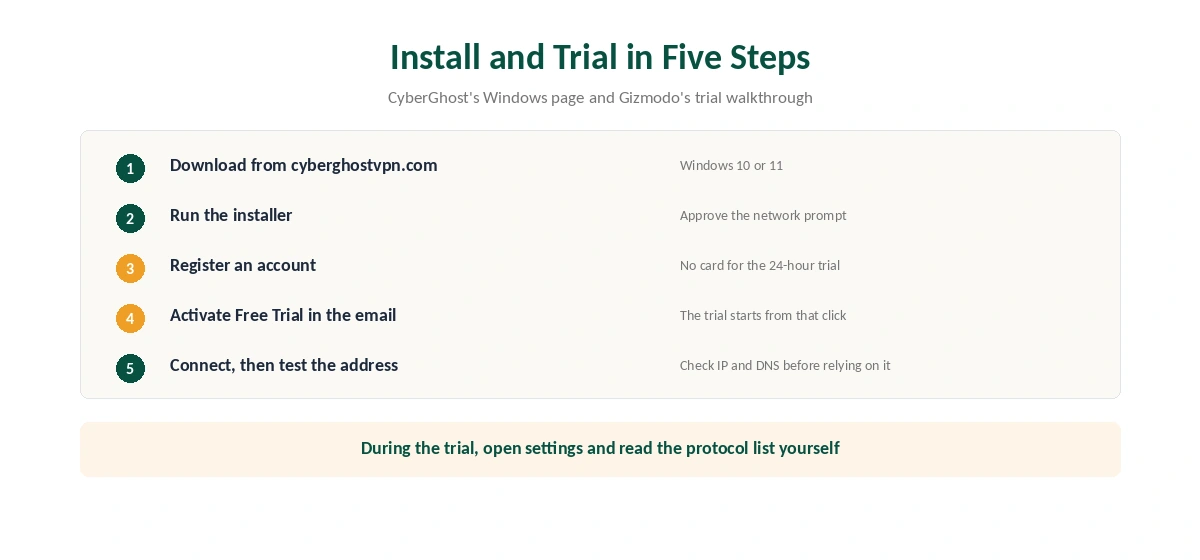
First, download the installer from CyberGhost’s Windows page and run it. Then sign in, or create an account for the trial. Gizmodo describes the trial step: after registering, press Activate Free Trial in CyberGhost’s email. Next, Windows may ask to allow network changes, so approve the prompt.
Finally, press Connect for the best location or pick a country from the list. Before you trust it, check the new address on our VPN test page.
CyberGhost also offers manual setup: you sign in to the account, download a configuration file and import it into a VPN client. However, the app handles the kill switch and Smart Rules for you, so manual setup makes sense only where the app will not install.
Which Windows Versions CyberGhost Windows Supports
CyberGhost’s own page names Windows 10 and Windows 11 only. By contrast, third-party download sites such as FileHorse still list Windows 7 and 8 next to the current build. We trust the provider’s page, because an old listing does not mean a current app runs there.
We could not verify whether CyberGhost ships a native app for Windows on ARM. If you use an ARM laptop, start with the trial before you pay for a long plan.
The CyberGhost Windows Protocol Dispute
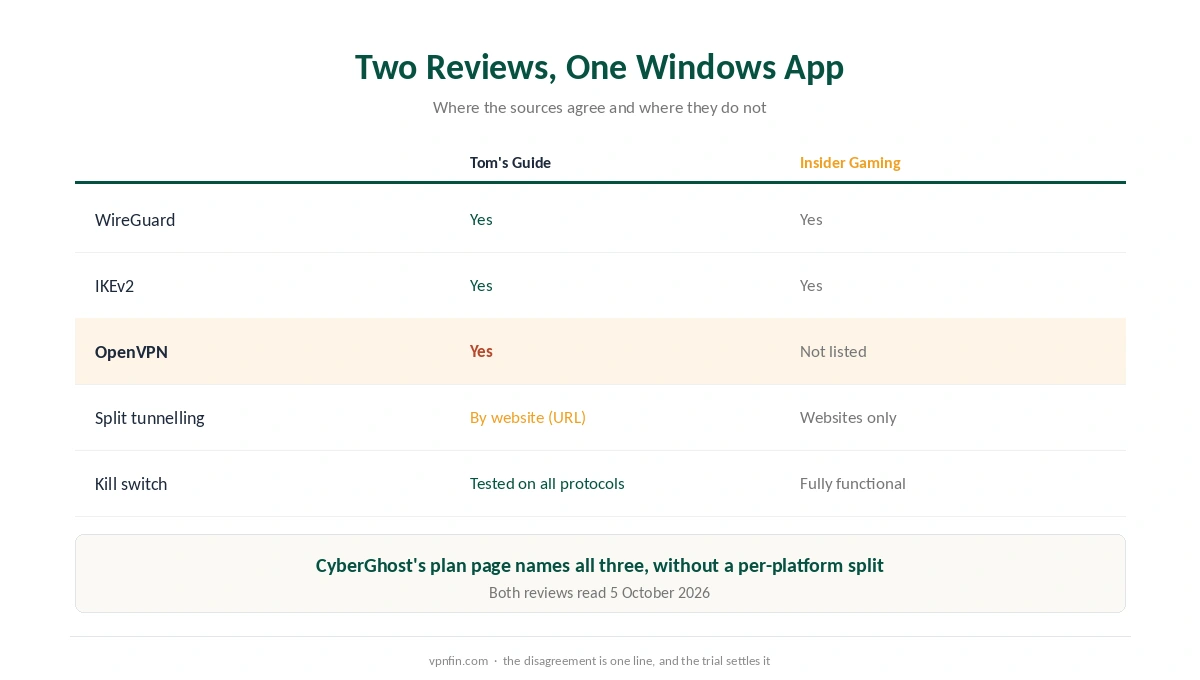
Tom’s Guide and Insider Gaming disagree on one line. In Tom’s Guide’s review, the Windows app offers WireGuard, OpenVPN and IKEv2, and the reviewer tested the kill switch on all three. In contrast, Insider Gaming lists only IKEv2 and WireGuard. CyberGhost’s plan page names all three protocols but gives no per-platform breakdown. Our guide to CyberGhost WireGuard covers the default in the apps, missing on routers.
We print both versions rather than pick one. The practical test is easy: open the app’s settings and look at the protocol list during the trial. If you need OpenVPN for a restrictive network, confirm it there first. Our WireGuard vs OpenVPN page explains why that matters.
Split Tunnelling Works by Website, Not by App
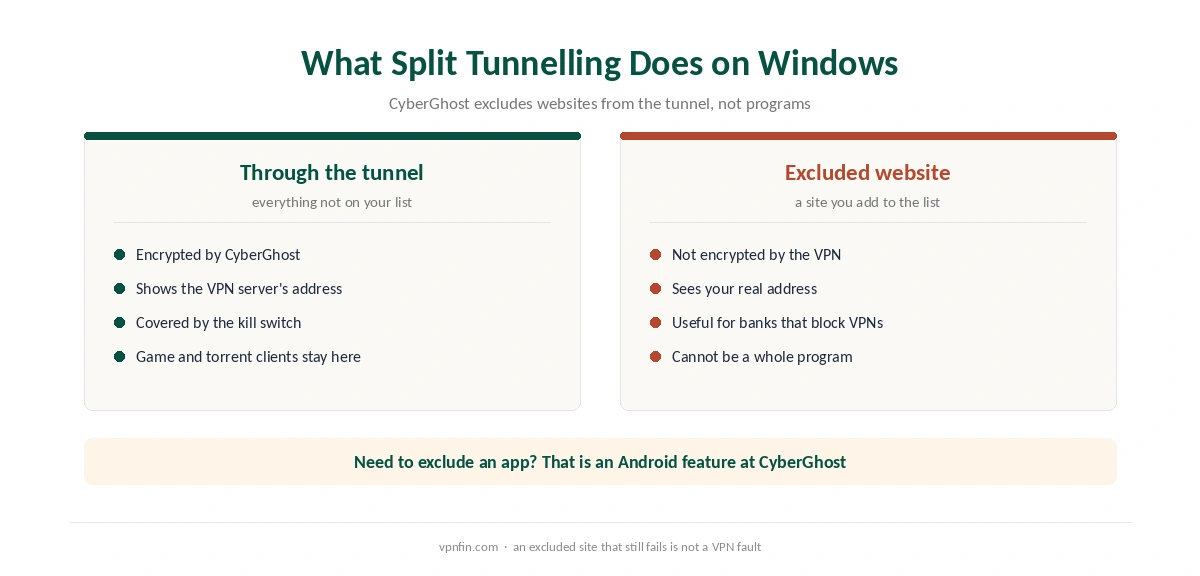
This is the CyberGhost Windows feature most likely to surprise you. Both reviews report that Windows split tunnelling lets you exclude websites from the tunnel, but not apps. Insider Gaming adds that traffic outside the tunnel goes out unencrypted, as it does with any split tunnel. Our guide to CyberGhost and OpenVPN covers whether it is supported and how to set it up.
For browsing, that works well: a banking site that blocks VPN addresses can bypass the tunnel. For a game client or a torrent app, however, you cannot exclude the program itself. Android is CyberGhost’s platform with split tunnelling by app, according to Tom’s Guide. Our split tunnelling explainer covers both kinds.
So for gaming, connect to a nearby server or pause the VPN; our gaming VPN guide covers the latency side. For downloads, keep the whole PC in the tunnel and rely on the kill switch, as our torrenting guide recommends.
Kill Switch, Smart Rules and Add-Ons
CyberGhost lists an automatic kill switch, and Insider Gaming calls it fully functional on Windows. Our kill switch guide explains what it does when the tunnel drops. Smart Rules, meanwhile, decide what happens at startup and on new Wi-Fi networks.
Two paid extras matter on a PC. A dedicated IP costs $5 a month or $60 for two years, and our dedicated IP guide explains when it helps. The Security Suite for Windows costs $24 for two years. It is a separate security product, and our VPN vs antivirus page explains why the two do different jobs.
CyberGhost Windows Problems and Fixes
When the app will not connect, check for a second VPN client first, since two tunnels clash. Then switch protocols in settings and restart the PC. If websites still fail, look at your split tunnelling list, because an excluded site bypasses the VPN by design. Our guide to CyberGhost Not Connecting covers eleven checks from CyberGhost, in order.
Our Windows VPN troubleshooting page covers network resets and adapter checks in order. Also, turning the VPN off is the quickest way to tell whether CyberGhost causes a fault.
What CyberGhost Costs on Windows
On 5 October 2026, CyberGhost showed two prices for the 26-month plan. The Android TV and Mac pages listed $2.19 a month, billed $56.94. The iOS page, however, ran $1.99, billed $51.74. After 26 months, the plan renews yearly at its first bill. On either grid, a renewal year costs about 2.2× what the intro rate charges over 12 months. Our guide to turning off or uninstalling CyberGhost covers disconnecting, the kill switch and a clean uninstall.
The 6-month plan costs $41.94 and the monthly plan $12.99. Website purchases carry a refund window of 45 days on the 6-month and 2-year plans, 14 days on the monthly plan. One plan covers 7 devices, so a PC and a Mac share it easily; our CyberGhost Mac guide covers the Mac app. Our CyberGhost refund guide explains the request.
| Provider | Renewal price | Per month | Tier |
|---|---|---|---|
| NordVPN | $139.08/yr | ~$11.59 | Basic |
| Surfshark | ~$79/yr | ~$6.58 | Starter |
| ExpressVPN | $99.95/yr | ~$8.33 | Basic |
| CyberGhost | $56.94/yr | ~$4.75 | 2-year |
| PureVPN | $47.95/yr | ~$4.00 | Standard, 2-year (1-year renews $57.95) |
| IPVanish | $89.99/yr | ~$7.50 | Essential |
| Windscribe | ~$69/yr | ~$5.75 | Pro |
| Proton VPN | ~$83.88/yr | ~$6.99 | VPN Plus |
| Mullvad | ~$65/yr | ~$5.40 | flat, no tiers |
| Norton VPN | $79.99/yr | ~$6.67 | Standard |
| Hotspot Shield | ~$95.99/yr | ~$8.00 | Premium annual |
| Astrill | $300 every 2 yrs | ~$12.50 | 2-year, same at renewal |
Who Should Use CyberGhost on Windows
CyberGhost on Windows suits PC owners who want a full app with a kill switch, Smart Rules and servers labelled for streaming, gaming and torrents. The 24-hour trial without a card helps too, as our CyberGhost free trial guide explains.
Who Should Pick Another Windows VPN
Pick another app if you need split tunnelling by app for a game or a download client. Our NordVPN Windows guide covers an app that excludes programs. Also, CyberGhost belongs to Kape Technologies, a London-based company that also owns ExpressVPN and Private Internet Access. For a wider view, see our Windows VPN guide.
How We Research
This page draws on CyberGhost’s Windows download page, trial page and add-on prices. We also read Tom’s Guide’s CyberGhost review, Insider Gaming’s Windows guide and Gizmodo’s trial walkthrough. We cross-checked these sources against each other, and where they conflict or something can’t be verified, we say so in the text rather than guessing. We checked time-sensitive figures, including prices in US dollars, on 5 October 2026. That day, CyberGhost showed two price grids on different pages. The main source we relied on is CyberGhost’s Windows download page. Our full approach lives on the About Us page.
CyberGhost on Windows FAQ
CyberGhost’s download page lists Windows 10 and Windows 11. Some third-party download sites still list Windows 7 and 8, but the provider’s page does not.
No. Tom’s Guide and Insider Gaming both report that Windows split tunnelling excludes websites only. Split tunnelling by app is available on CyberGhost’s Android app.
Tom’s Guide says yes, alongside WireGuard and IKEv2. Insider Gaming lists only IKEv2 and WireGuard. Check the protocol list in the app during the 24-hour trial.
Yes, 24 hours without a card. Install the app, register, then press Activate Free Trial in CyberGhost’s email.
It is a separate security add-on for Windows that costs $24 for two years. It does not change how the VPN works.
The Verdict
CyberGhost on Windows is the most complete version of the app, with a trial, a kill switch and labelled servers. Its website-only split tunnelling is the catch for gamers and torrent users. Use the 24-hour trial to check the protocol list and the split tunnelling screen, then buy on the website for the 45-day refund.