
Disclosure: VPNFin is reader-supported. If you buy a VPN through links on this page, we may earn a commission at no extra cost to you. This never affects our ratings — here’s our full disclosure.
PIA on an Nvidia Shield works through Private Internet Access’s native Android TV app, which Tom’s Guide lists among its platforms and says PIA upgraded in 2024. VPNCentral describes the app as easy to navigate with a remote. PIA sets no device limit and adds port forwarding, which suits a Shield running Plex or torrent apps. One point divides sources: whether split tunnelling works on Android.
This guide covers the setup, the features, the split tunnelling question and the settings worth changing.
PIA Nvidia Shield Setup
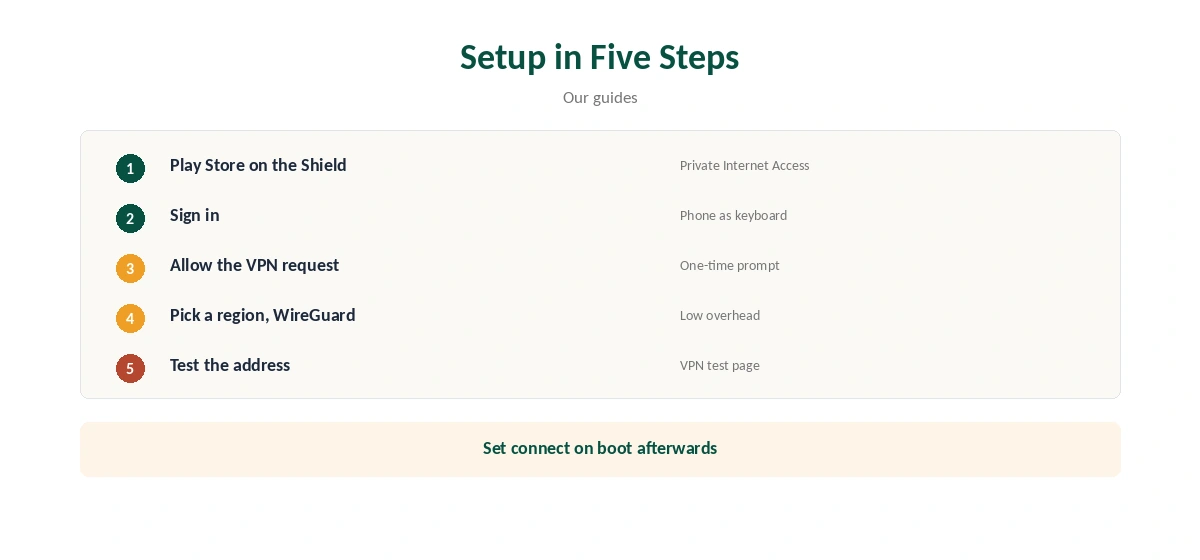
Open the Play Store on the Shield, search for Private Internet Access, and install it. Sign in with your PIA account; using a phone as a keyboard saves time with the remote. Allow the VPN connection request, pick a region and connect.
Confirm the new address with our VPN test page in the Shield’s browser or through a streaming app’s location.
Split Tunnelling: Sources Disagree
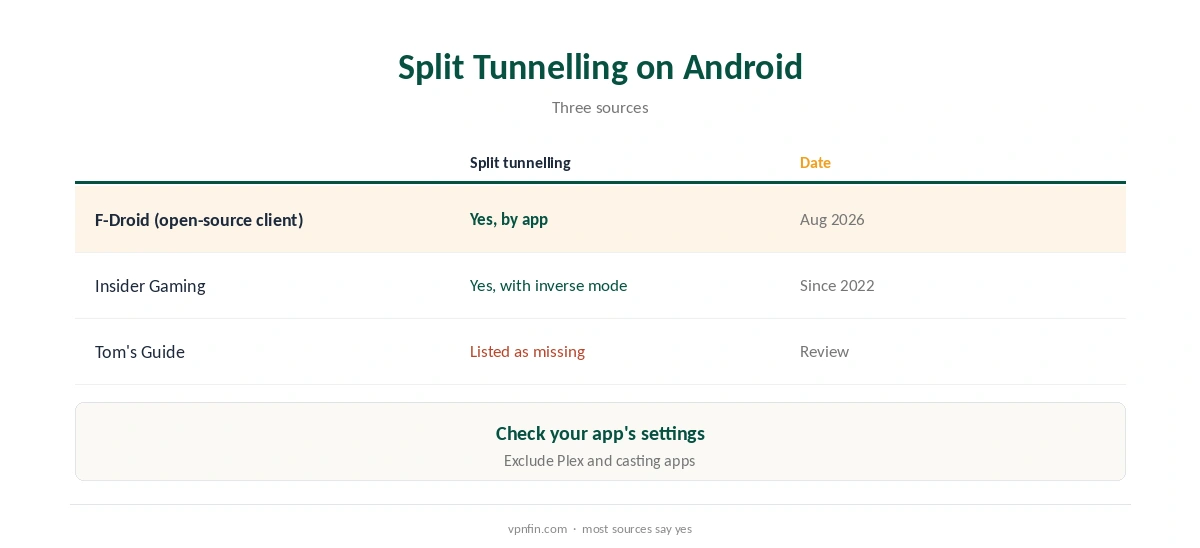
Tom’s Guide lists no split tunnelling on Android among PIA’s drawbacks. Other sources disagree. F-Droid’s listing for PIA’s open-source Android client, version 4.0.39 from August 2026, names split tunnelling by app. Insider Gaming says it has been on Android since at least 2022, including an inverse mode.
Check the app’s settings on your Shield. If it is there, exclude local apps such as Plex or casting tools so they keep seeing your home network. Our split tunnelling guide explains the idea.
Features on Android TV
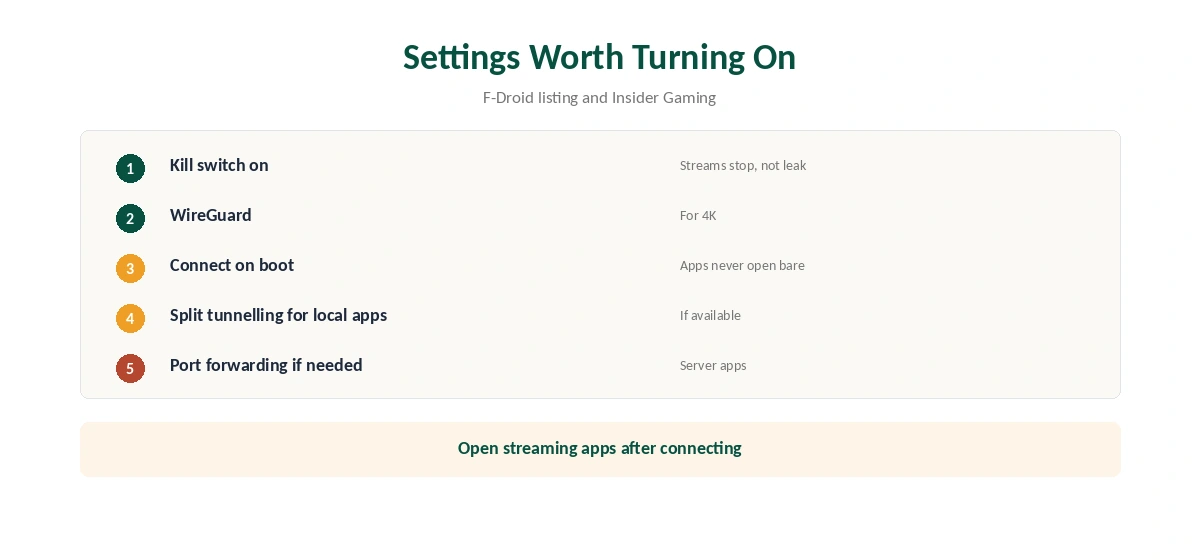
The F-Droid listing names a kill switch, and Insider Gaming lists WireGuard and OpenVPN, obfuscation and port forwarding on Android. VPNCentral adds that PIA runs RAM-only servers. Choose WireGuard for 4K streaming, since it keeps overhead low.
Port forwarding helps if the Shield runs a server app that needs incoming connections, as our port forwarding guide explains.
Settings Worth Turning On
Turn on the kill switch so streams stop rather than leak if the tunnel drops. Set PIA to connect on boot, so streaming apps never open without it. Use split tunnelling for local apps, and pick a region close to the content you watch.
Streaming Apps on the Shield
Open streaming apps only after PIA connects. If an app shows the wrong library, close it fully, clear its cache in the Shield’s app settings and reopen it. Our Netflix VPN guide covers how services detect VPNs.
PIA Nvidia Shield for Plex and Local Apps
Many Shield owners run Plex or cast from phones. A VPN can hide the Shield from your home network, which breaks local discovery. VPNCentral suggests keeping streaming apps inside the tunnel and local casting apps outside it with split tunnelling. If your PIA app lacks that option, connect only when you stream from abroad. Our Synology VPN guide covers the NAS side.
Other Android TV Devices
The same app runs on other Android TV and Google TV devices. Our Google TV Streamer guide covers Google’s box. PIA also lists Amazon Fire TV among its platforms, so a PIA Nvidia Shield setup carries over to Fire TV sticks with the same steps in the Amazon Appstore.
Choosing a Region for Streaming
Pick the region that matches the library you want, then open the streaming app. For everyday privacy, choose a region near you to keep speeds high. PIA marks its servers clearly in the app, Insider Gaming notes, which helps with a remote. Save favourite regions so switching takes one click.
Is PIA Nvidia Shield Use Worth It?
For a Shield owner who wants one plan for every device, PIA’s unlimited devices make it good value. Port forwarding suits Shields running server apps. Against that, Kape owns PIA, and the split tunnelling question means some users will want to test before committing. Use the 30-day window to decide.
Gaming on the Shield
The Shield also streams games. A VPN adds a step between you and game servers, so expect slightly higher latency. Use split tunnelling for game streaming apps if it is available, or disconnect while playing. Our gaming VPN guide explains the trade-off.
A Quick Rule
Streaming on the Shield? Connect first, then open the app. Running Plex? Exclude it from the VPN. Torrenting? Use port forwarding with the kill switch on. For any PIA Nvidia Shield setup, our kill switch guide explains why that setting matters.
Troubleshooting
If PIA will not connect, switch between WireGuard and OpenVPN, then try another region. Restart the Shield if the app stalls after an update. Our Android VPN troubleshooting guide covers more fixes. Our page on PIA troubleshooting on Firestick covers Fire TV models, protocol changes and the Advanced Kill Switch.
Costs and Refunds
PIA sets no device limit, according to our device table, so the Shield, phones and laptops share one plan. Its money-back guarantee lasts 30 days; our PIA refund guide covers the steps. PIA belongs to Kape Technologies, which also owns ExpressVPN and CyberGhost.
| Provider | Renewal price | Per month | Tier |
|---|---|---|---|
| NordVPN | $139.08/yr | ~$11.59 | Basic |
| Surfshark | ~$79/yr | ~$6.58 | Starter |
| ExpressVPN | $99.95/yr | ~$8.33 | Basic |
| CyberGhost | $56.94/yr | ~$4.75 | 2-year |
| PureVPN | $47.95/yr | ~$4.00 | Standard, 2-year (1-year renews $57.95) |
| IPVanish | $89.99/yr | ~$7.50 | Essential |
| Windscribe | ~$69/yr | ~$5.75 | Pro |
| Proton VPN | ~$83.88/yr | ~$6.99 | VPN Plus |
| Mullvad | ~$65/yr | ~$5.40 | flat, no tiers |
| Norton VPN | $79.99/yr | ~$6.67 | Standard |
| Hotspot Shield | ~$95.99/yr | ~$8.00 | Premium annual |
| Astrill | $300 every 2 yrs | ~$12.50 | 2-year, same at renewal |
Related Guides
Our Nvidia Shield VPN guide compares providers for the Shield.
How We Research
This page draws on Tom’s Guide’s PIA review, F-Droid’s listing for PIA’s open-source Android client, Insider Gaming’s PIA Android guide, VPNCentral’s Shield roundup and our device and ownership tables. We cross-checked these sources against each other, and where they conflict or something can’t be verified, we say so in the text rather than guessing. We checked time-sensitive figures, including prices in US dollars, on 7 October 2026. The main source we relied on is Tom’s Guide’s PIA review. Our full approach lives on the About Us page.
PIA Nvidia Shield FAQ
Yes, through its Android TV app in the Play Store.
Sources disagree; F-Droid and Insider Gaming say yes, Tom’s Guide says no. Check the settings.
Yes, per its open-source client listing.
PIA sets no device limit.
Insider Gaming lists port forwarding on Android.
The Verdict
PIA Nvidia Shield use is straightforward through the Android TV app, with a kill switch, WireGuard and unlimited devices. Check split tunnelling in your app version, since sources disagree, and test within 30 days.