
Disclosure: VPNFin is reader-supported. If you buy a VPN through links on this page, we may earn a commission at no extra cost to you. This never affects our ratings — here’s our full disclosure.
A VPN on your router protects everything behind it — phones, laptops, smart TVs, consoles, guests, and every device that cannot run VPN software. For a NAS, see our Synology NAS guide.
Roku and games consoles fall into that last category, and a router is the cleanest answer for both — the PlayStation case covers the console side in full.
Streaming boxes running Kodi benefit for the same reason.
There is a second benefit that matters more than most guides admit: the router counts as a single connection against your VPN’s device limit. With a provider capping you at seven, one slot covers your entire home network. It also fixes a problem apps can’t — casting stops working when your phone is on a VPN and your Chromecast isn’t.
| Provider | Simultaneous | Notes |
|---|---|---|
| NordVPN | 10 | — |
| Surfshark | Unlimited | no cap in terms |
| ExpressVPN | 10/12/14 | by tier |
| CyberGhost | 7 | router counts as one |
| PureVPN | 10 | up to 50 with paid add-on |
| IPVanish | Unlimited | no cap on any plan |
| Windscribe | Unlimited | including Build a Plan |
| Private Internet Access | Unlimited | no tier gating |
| Mullvad | 5 | no paid add-on |
| TunnelBear | Unlimited | no cap on any plan |
| Norton VPN | 5 | 10 on Ultimate, US only |
| Hotspot Shield | Disputed | sources give five and ten |
| IVPN | 5 | 10 on Pro Suite |
| PrivadoVPN | 10 | 1 on the free tier |
| StrongVPN | 12 | more than either market leader |
| PrivateVPN | 10 | free dedicated IP on one plan |
| VyprVPN | Disputed | sources give five and ten |
| Astrill | 5 or unlimited | sources disagree; Astrill's page says unlimited in the household |
| TorGuard | 8, 12 or 30 | by plan |
| ZoogVPN | 10 | 1 on the free tier; some reviews say unlimited |
| FastestVPN | 10 | 15 on the PRO lifetime plan |
| Hide.me | 10 | 1 on the free tier |
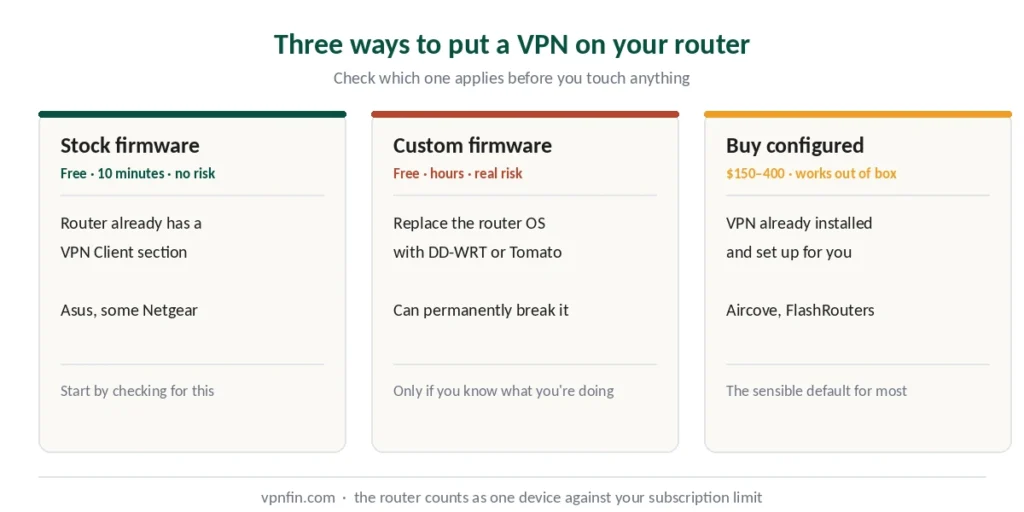
Getting there takes one of three routes, and they differ enormously in difficulty and risk.
The Three Paths
Stock firmware with built-in VPN support. Some routers ship with a VPN client already in the interface. Import a configuration file, enter your credentials, done. No risk, no cost beyond the subscription.
Custom firmware. Replacing your router’s operating system with DD-WRT, OpenWRT or Tomato to add VPN capability. Free, powerful, and carries a real chance of permanently disabling the hardware. Our page on VyprVPN on a router covers DD-WRT setup with OpenVPN. If flashing firmware sounds like too much, Aircove vs a DIY VPN router compares a ready-made option. For a router that arrives ready, see our Aircove setup guide.
A pre-configured router. Buy one with the VPN already set up. Costs $150–400, works out of the box.
Start Here: Check What You Have
Before anything else, find out which path applies to you.
Log into your router. Type 192.168.1.1 into your browser. If that fails, try 192.168.0.1 or 192.168.50.1. Asus routers also answer to router.asus.com.
Credentials are usually printed on a sticker underneath the router. If they were never changed, the username is often admin with either admin or a blank password.
Look for a VPN section. In the menu, find anything labelled VPN, VPN Client, or similar. If it exists, you’re on Path 1 and the rest is straightforward.
⚠️ VPN Server and VPN Client are different things. Many routers offer a VPN server — for connecting to your home network from outside. You need the client, which routes your traffic out through a provider. If only the server option exists, your router cannot do what you want without new firmware — though that server side is a project in its own right, and a Raspberry Pi does it better than most router firmware.
No VPN section at all? Most ISP-supplied routers have none. That means Path 2 or Path 3.
Path 1: Stock Firmware
Asus is the easiest, with VPN client support built into the AsusWRT interface across most of its range. Several Netgear models and some higher-end routers from other brands also qualify.
What you need: configuration files from your VPN provider, downloaded before you start. Most providers publish OpenVPN or WireGuard files for router use. Our page on IKEv2 vs WireGuard covers speed tests, network switching and code size compared.
Connect by Ethernet, not Wi-Fi. The wireless connection may drop during setup, which leaves you locked out mid-configuration.
The general shape of it: log in, find the VPN Client section, import the configuration file, enter your VPN username and password, activate. Exact menu names vary by brand and firmware version — follow your provider’s guide for your specific model rather than a generic one.
⚠️ Router credentials are not VPN credentials. Most providers issue separate service credentials for manual configuration, found in your account dashboard. Your login email and password usually will not work.
Path 2: Custom Firmware — Read This First
Replacing your router’s firmware with DD-WRT, OpenWRT or Tomato adds VPN capability to hardware that lacks it. It is free and it works.
It can also permanently destroy your router. Every source we consulted warns about this in the same terms: an interrupted or incorrect flash leaves the device unusable, and there is often no recovery.
Before you consider it:
Check your exact model number against the firmware project’s compatibility database. Not “the Netgear R7000” — the specific hardware revision printed on the label, since revisions differ.
Never interrupt the process. No unplugging, no closing the browser, no power cuts. A UPS is not overkill here.
Use Ethernet throughout. A Wi-Fi drop during a flash is one of the most common ways this goes wrong.
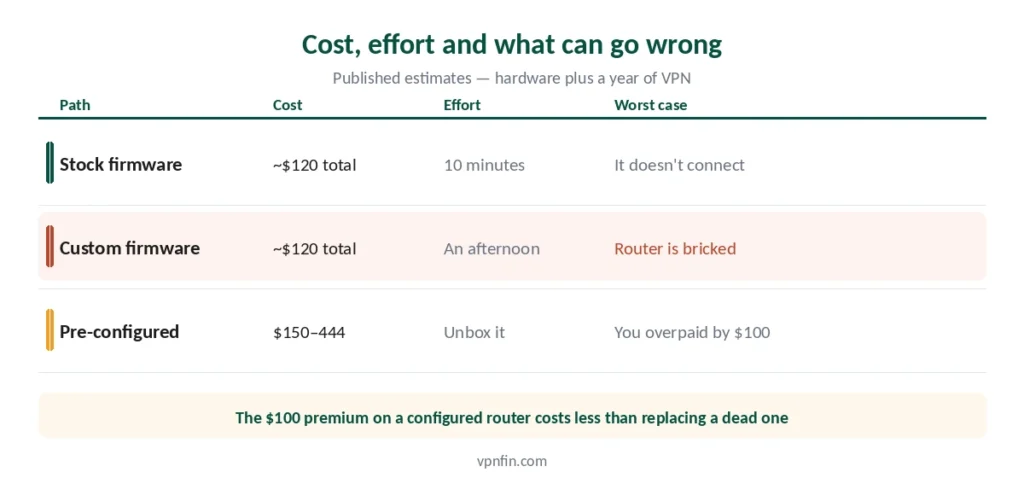
Our honest recommendation: if you are not already comfortable with this, take Path 3. The $100 premium on a pre-configured router costs less than replacing a dead one, and considerably less than a weekend of troubleshooting.
Path 3: Buy It Configured
Several vendors sell routers with VPN firmware already installed, and some providers sell their own hardware.
ExpressVPN’s router is the notable one among the providers we rank. Aircove was retired from sale in September 2026 and replaced by Fortify, built with GL.iNet, which connects over WireGuard at launch, with Lightway promised in a later update. It is the only provider in our top five with its own router product, covered in our ExpressVPN review.
Third-party vendors sell routers pre-flashed with DD-WRT or Tomato and configured for your chosen provider. Expect a markup of around $100 over the retail price of the same hardware.
What it costs overall. Published estimates put a budget setup at roughly $120 — an $80 router plus $40 a year for the VPN — and a premium one at around $444. Our guide to IPVanish on a Router covers built-in WireGuard on GL.iNet, OpenVPN elsewhere.
What You Give Up
Router VPNs have genuine drawbacks, and no vendor selling one will list them.
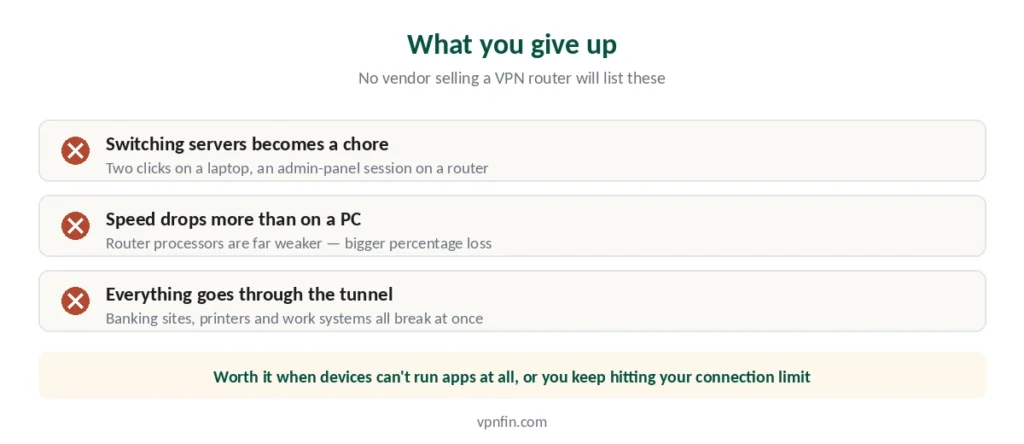
Switching servers becomes a chore. On a laptop it is two clicks. On a router it means logging into the admin panel and reconfiguring. If you switch countries often for streaming, this will irritate you daily. Our guide to Proton VPN on a Router covers supported firmware, WireGuard setup and trade-offs.
Speed drops more than on a computer. Router processors are far weaker than a laptop CPU, and encryption is demanding. Expect a bigger percentage loss than the same VPN gives you on a PC — which matters if you’re already choosing between providers on speed, as our cheap VPN guide sets out.
Everything goes through the tunnel. Banking sites that reject VPN traffic, local network printers, work systems that block foreign IPs — all of them break at once. Some firmware supports split tunnelling to exempt specific devices; much of it does not. Our guide to StrongVPN WireGuard covers the config generator, routers and devices.
Switching it off is not one click either. The kill switch is a separate setting from the client, so stopping the tunnel while it is armed blocks every device on the network at once — the order to do it in matters more than the steps.
WireGuard helps. Where your router and provider both support it, it is measurably faster than OpenVPN on constrained hardware. Our page on PureVPN OpenVPN covers UDP or TCP, manual setup and the configuration files.
Which VPN Works Best on a Router
ExpressVPN for the least effort — Fortify, its new router, comes with a year of the service included.
NordVPN publishes detailed guides for DD-WRT, Tomato and AsusWRT, though it has no dedicated router app, so setup is manual. It is also the fastest of the five in independent testing, which matters when the router is already costing you throughput — see our NordVPN review.
Any of the five we rank publishes router configuration files. The differences are in documentation quality rather than capability. Our guide to Astrill on a Router covers DD-WRT, Tomato, Merlin and the OpenWrt gap.
⚠️ One thing to verify before buying: that your provider’s guides cover your specific router model and firmware. Generic instructions get you halfway and leave you there.
Using one of the big three? Routers treat them very differently: Surfshark issues WireGuard keys, most routers run NordVPN over OpenVPN, and ExpressVPN has replaced Aircove with Fortify.
On Starlink? Our Starlink guide explains what Bypass mode does and doesn’t fix. Unsure whether you need a router at all? See our router vs device guide.
How We Research
This guide draws on published setup documentation from VPN providers and router manufacturers, technical guides from named sources including SafetyDetectives, CyberInsider and WizCase, and our own full reviews of the providers we rank — cross-checked and verified at publication. Menu paths and interface labels vary by router brand and firmware version; we describe the general shape rather than claiming specific steps apply universally. Our full approach lives on the About Us page.
VPN Router FAQ
Log into the admin panel — usually 192.168.1.1 in your browser — and look for a VPN Client section. Asus routers running AsusWRT support it across most of the range, as do some Netgear models. Most ISP-supplied routers do not. Note that a VPN Server option is not the same thing: that lets you connect into your home network, not route traffic out through a provider.
Yes, and this is one of the strongest reasons to set one up. Your VPN sees a single connection regardless of how many devices sit behind the router. With a provider limiting you to seven connections, one slot covers your whole home network. With unlimited connections the calculation disappears entirely, though you still gain coverage for devices that can’t run apps.
Yes, permanently. An interrupted or incorrect flash can leave the device unusable with no recovery path. Check your exact hardware revision against the firmware project’s compatibility database, use a wired connection throughout, and never interrupt the process. If that sounds daunting, buy a pre-configured router instead.
More than the same VPN on a computer would. Router processors are considerably weaker and encryption is demanding, so the percentage loss is larger. WireGuard is measurably faster than OpenVPN on constrained hardware where both your router and provider support it.
ExpressVPN, because Aircove ships with the VPN built into the firmware and needs no configuration at all. Among providers requiring manual setup, NordVPN publishes the most detailed guides for DD-WRT, Tomato and AsusWRT, though it has no dedicated router application.
Only if your firmware supports split tunnelling, and much of it does not. Without that, everything on the network goes through the tunnel — including banking sites that reject VPN traffic and work systems that block foreign IP addresses. This is the most common reason people abandon router setups, and Xbox Cloud Gaming is a specific case of it.
The Short Version
Check your router first. If it has a VPN Client section in the admin panel, you are ten minutes from done and nothing here applies.
If it doesn’t, buy a pre-configured router rather than flashing your own — unless you already know what a hardware revision is and why it matters. Our page on TunnelBear on a router covers the unofficial OpenVPN route and its limits.
Either way, know what you’re trading: server switching becomes tedious, speed drops more than on a computer, and everything on your network goes through the tunnel whether it suits that device or not. Our page on PureVPN on a Router covers supported brands, credentials and MikroTik.
For most people, running the VPN app on each device remains simpler. The router makes sense when you have devices that cannot run apps at all, or a device limit you keep hitting.